














































































































Quick Summary
- AI data leakage is when company data escapes through AI tools during normal work.
- Data leaks through prompts, vendors, copilots, model outputs, and AI agents.
- Source code, customer data, and financials are most at risk.
- Consumer AI accounts may train on your data; business plans do not by default.
- Banning AI tools pushes use onto personal devices you cannot see.
- Approve good tools and route AI traffic through a gateway that inspects it.
AI data leakage is the exposure of confidential business data through the AI tools that employees and systems use every day, and in most cases, nobody hacks anything. Someone pastes a customer list into a chatbot to get a quick summary. A developer asks an AI assistant to fix a function and includes the database password. A copilot answers a routine question with a file the user was never meant to see.
The numbers show how ordinary this has become. The IBM Cost of a Data Breach Report 2026 found that incidents involving shadow AI, meaning AI tools staff use without approval, affected 43% of breached organizations, up from 20% a year earlier. Those breaches averaged $5.39 million, against a record global average of $4.99 million. Among organizations that suffered an AI-related breach, 92% lacked proper AI access controls.
Adoption is moving faster than control. The Verizon 2026 Data Breach Investigations Report found that 45% of employees now use AI regularly on corporate devices, up from 15% the year before.
This guide explains how AI data leakage happens, which business data is most exposed, what real incidents teach, and how to stop leakage where data actually leaves: the layer between your people and the models. It draws on what our engineers learned building Guardian Layer, the enterprise AI gateway developed by Hidden Brains.
What Is AI Data Leakage?
AI data leakage is the unintended exposure of sensitive, regulated, or proprietary information through the use, integration, or output of an AI system. The data might leave in a prompt, sit in a vendor’s logs, surface in a model’s answer, or move through an AI agent’s actions.
The OWASP Top 10 for LLM Applications treats this as a core risk category: Sensitive Information Disclosure is ranked LLM02:2025, second only to prompt injection. For a business, the practical meaning is simple. Any route that lets company data reach an AI model, or lets a model reach company data, is a route that can leak.
AI Data Leakage vs a Traditional Data Breach
The two differ most in who causes them and how they are found.
| Dimension | Traditional data breach | AI data leakage |
|---|---|---|
| Typical cause | External attacker, stolen credentials, exploited vulnerability | Employee, application, or agent sending data during normal work |
| Intent | Usually malicious | Usually well-meaning, often productivity-driven |
| Detection | Firewalls, intrusion detection, endpoint alerts | Often invisible to those tools, because the traffic looks like normal web or API use |
| Where data ends up | An attacker’s system | A third-party AI vendor’s servers, logs, or, in some cases, training data |
| Recovery | Contain, rotate credentials, notify | Data already shared often cannot be recalled from a vendor’s systems |
How Do AI Tools Leak Confidential Information?
AI tools leak confidential information through five main routes: what people type or upload, what vendors keep, what connected assistants can retrieve, what models say back, and what AI agents do. Most organizations watch one or two of these. Leakage happens in the rest.
1. Prompts and Uploads Sent to Public AI Tools
This is the most common route of data leakage through AI tools. An employee pastes a contract clause, a customer export, or a block of source code into a public chatbot to save time. Once submitted, that data sits on the vendor’s infrastructure under the vendor’s terms, not yours.
2. Vendor Retention and Model Training
AI training data privacy depends on the plan, not the product name. OpenAI’s consumer data usage FAQ states that content from consumer ChatGPT can be used to improve its models unless the user opts out, and the opt-out applies only going forward. Business offerings carry different commitments. An employee on a personal account gets consumer terms, even when the data belongs to the company.
3. Over-Permissioned Copilots and RAG Assistants
An enterprise copilot or internal assistant built on retrieval-augmented generation (RAG) answers using whatever documents it can reach. If permissions on SharePoint, the CRM, or a knowledge base are too broad, the assistant will surface salary files or board papers to anyone who asks the right question. The AI did not break access control. It exposed how loose access control already was. Our comparison of RAG vs LLMs explains why retrieval design matters so much here.
4. Model Outputs, Memorization and Prompt Injection
Models can repeat sensitive data in their responses, whether it came from earlier context, connected systems, or, in rarer cases, memorized training data. Prompt injection makes this worse: hidden instructions in a webpage, email, or document can trick an AI system into revealing data it holds or sending it somewhere. OWASP ranks prompt injection as LLM01:2025, the top risk for LLM applications.
5. AI Agents, Plugins, MCP Connections and Browser Extensions
Agents do more than answer. They read databases, send emails, update records, and call third-party APIs. An agent with broad permissions can move data between systems faster than any person, which is why OWASP lists Excessive Agency (LLM06:2025) as its own risk. Standards like the Model Context Protocol (MCP) make these connections easier to build, and every connection is another path data can travel.
Which Business Data Is Most Exposed to AI Leakage?
The data most exposed in AI is the data people need help working with: code they are debugging, customer records they are summarizing, and documents they are rewriting. Sensitive data exposure in AI follows the workflow, so the riskiest data types differ by team.
| Data type | Typical leak path | Business impact | Regulations often in scope |
|---|---|---|---|
| Source code and credentials | Pasted into chatbots or AI coding assistants for debugging | Lost IP, exposed API keys and passwords | Contractual and trade-secret obligations |
| Customer PII | Customer exports summarized or analyzed in public tools | Privacy violations, fines, loss of customer trust | GDPR, UAE PDPL, Saudi PDPL, India DPDP Act |
| Patient and health data (PHI) | Clinical notes or messages drafted with unapproved AI | Regulatory penalties, patient harm | HIPAA, local health data laws |
| Financial data | Forecasts, pricing and unreleased results pasted for analysis | Market and insider risk, competitive damage | Securities and banking rules, PCI DSS for card data |
| Contracts and legal documents | Uploaded for review or redlining | Breach of confidentiality clauses, privilege issues | Client contracts, legal privilege |
| HR and employee records | Performance reviews and salary data rewritten with AI | Employee privacy claims | Employment and privacy laws |
| Strategy and M&A material | Board papers summarized, deal memos drafted | Leaked plans, failed deals | NDAs, market abuse rules |
Healthcare shows why this matters. When Hidden Brains built a HIPAA-compliant patient messaging platform for private clinics, HIPAA requirements were documented at the analysis stage and health records were encrypted at rest and in transit. Adding AI to a workflow like that changes nothing about those obligations. It adds a new route that must meet them. For data protection obligations in Europe, our guide to GDPR compliance strategies covers the fundamentals.
Shadow AI Risks in the Workplace: The Tools You Never Approved
Shadow AI is the use of AI tools without approval from IT or security, and it is now the single largest source of workplace AI data leakage. It usually starts with good intentions: an employee finds a tool that saves an hour a day and uses it with a personal account.
The risk is that nobody can see what goes into those tools. IBM’s 2026 research found that more than two-thirds of organizations had no governance process to limit shadow AI. The share of organizations requiring IT approval for AI deployments also fell, from 45% to 38%, even as shadow AI incidents doubled. For leaders, the lesson is direct: if the approved option is slower or weaker than the shadow one, people will keep choosing the shadow one.
AI Data Leakage Examples: What Real Incidents Teach
The best-known AI data leakage examples share one trait: no attacker was needed. Each was caused by normal use, a software bug, or a configuration mistake.
| Incident | What happened | Lesson for businesses |
|---|---|---|
| Samsung, March 2023 | Within weeks of allowing ChatGPT, semiconductor engineers entered confidential data at least three times, including equipment source code and internal meeting notes. Samsung restricted generative AI from May 2023. | Policy alone did not stop well-meaning staff. Controls need to sit in the workflow. |
| OpenAI ChatGPT bug, March 2023 | A bug in the redis-py library let some users see other users’ chat titles. Payment details of 1.2% of ChatGPT Plus subscribers active in a nine-hour window may have been exposed, though not full card numbers. | Data sent to any vendor is exposed to that vendor’s bugs, not only its policies. |
| Microsoft AI research, disclosed September 2023 | A storage link shared in a public GitHub repository for AI models gave full access to an entire storage account, exposing 38TB of data, including passwords, secret keys, and over 30,000 internal Teams messages. | AI projects create new data stores and access tokens that need the same governance as production systems. |
ChatGPT Data Leak Risks for Business: Consumer vs Business Plans
The biggest ChatGPT data leak risk for business is staff using consumer accounts for company work. The terms that protect company data apply to business plans, and only when staff actually use them.
| Question | Consumer ChatGPT (Free, Plus, Pro) | ChatGPT business plans and API |
|---|---|---|
| Is content used to train models? | May be used unless the user opts out, going forward only (source) | OpenAI states it does not train on business data; API data is not used for training unless the customer opts in (source) |
| Who controls retention? | The individual user | The organization (retention controls are listed for ChatGPT Enterprise) |
| Admin and identity controls | None | Enterprise SAML SSO and access controls |
| Encryption | Standard service encryption | AES-256 at rest and TLS 1.2+ in transit, SOC 2 audited |
Vendor terms change, so check the current policy pages before relying on them. The same logic applies to Claude, Gemini and Microsoft Copilot: the plan, not the brand, decides how your data is handled.
Why Banning AI Tools Does Not Stop Data Leakage
Banning AI tools rarely stops AI data leakage. It moves the leakage to places you cannot see. After a ban, the same tasks still need doing, so employees switch to personal phones, home laptops, and personal accounts, where no corporate control applies.
A ban also blocks the productivity gain that made people use AI in the first place. The better approach is to approve tools that are as useful as the shadow ones, then put controls in the path the data takes. Our article on AI guardrails and sovereign AI gateways explains why enterprises are moving toward that model.
Give Teams Approved AI With Built-In Controls.
Talk to Us
How to Prevent AI Data Leakage: Inspect Every Route In and Out
To prevent AI data leakage, inspect every route through which data enters or leaves an AI system, not only the text a user types. Generative AI data security fails when controls cover the chat box but miss the file upload, the retrieved document, or the agent’s next action.
What a Guardian Layer Inspects
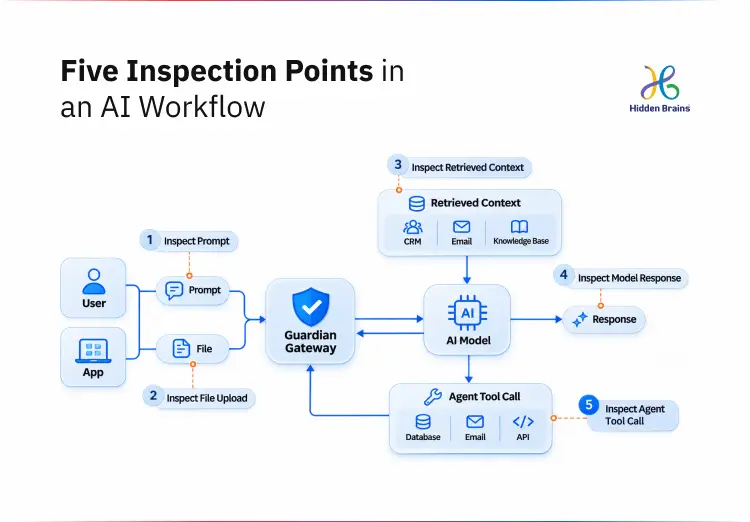
A guardian layer is a control point that sits between users, applications and agents on one side and AI models on the other. A complete one covers five inspection points:
- Prompt: typed or pasted text, including customer records, credentials, internal documents and instructions.
- File upload: contracts, spreadsheets, PDFs, images, code, and other attachments sent for analysis.
- Retrieved context: information pulled from email, CRM, knowledge bases, or connected databases through RAG.
- Model response: output that may repeat regulated data, expose connected-system information, or contain unsafe content.
- Agent tool call: actions such as reading a database, sending an email, updating a record, or calling a third-party API.
A Practical Example: One Prompt, Start to Finish
Here is how a gateway handles a routine request. This is an illustrative scenario, not a client case study.
A sales manager pastes a renewal spreadsheet into the company’s approved AI assistant and asks: “Which of these accounts are at risk of churning?” The sheet holds customer names, email addresses, contract values, and, in a notes column, an API key someone saved months ago.
- Detect. The gateway scans the prompt and attachment and finds names, emails, contract values, and a secret that matches an API key pattern.
- Decide. Policy says customer identifiers may be processed only in masked form, and secrets are never sent.
- Redact. Each identifier is replaced with a token before anything reaches the model. The API key is removed.
- Process. The model analyzes the masked data and returns its churn assessment.
- Check the response. The output is scanned on the way back for any regulated data the model may have repeated.
- Restore and record. Tokens are mapped back so the manager sees real account names, and an audit entry records what was caught and which policy applied.
| What the manager sent | What the model received |
|---|---|
| Acme Logistics, priya.n@acmelogistics.com, $184,000, renewal due March | [CUSTOMER_1], [EMAIL_1], [AMOUNT_1], renewal due March |
| Notes: API key sk-live-4f9a… | Notes: [SECRET_REMOVED] |
The manager still gets a useful answer. The model provider never sees a customer name or a working credential. Guardian Layer’s published redaction latency is under 30 milliseconds, which matters because a control that slows people down becomes a reason to go back to shadow AI.
A second, shorter case: a developer sends a file to an AI coding assistant and the file contains a hard-coded database password. The gateway blocks the request, tells the developer why, and logs the event so the credential can be rotated.

Find Where AI Could Expose Your Business Data.
Check AI RiskThe Layers Around the Gateway
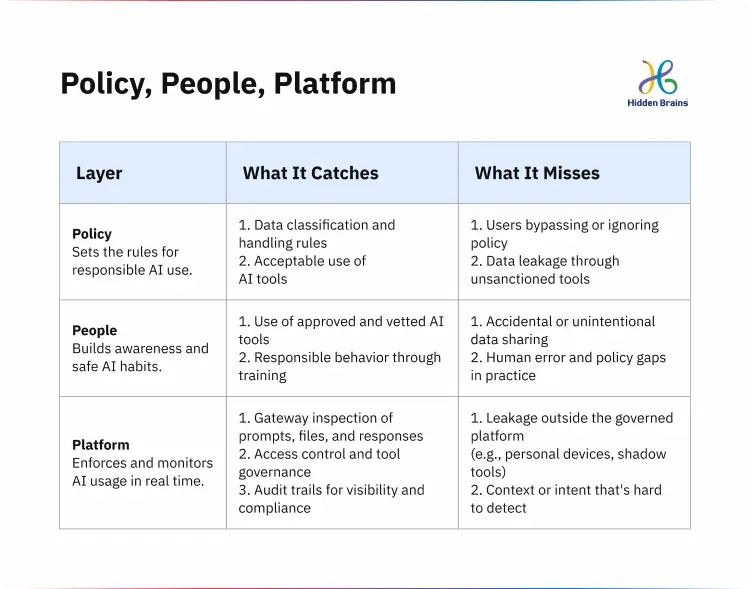
A gateway works best inside a wider program. Four supporting steps make the inspection points effective:
- Classify what can never leave. Tag data by sensitivity at the source. Our intelligent record management system project shows this in practice, with automated classification by content and sensitivity, role-based permissions, and audit trails.
- Write an AI use policy people can follow. Name approved tools, list data that is never shared, and explain why.
- Give staff sanctioned tools that are genuinely useful. Approval works only when the approved option is as good as the shadow one.
- Monitor and rehearse. Review blocked events, rotate exposed credentials, and test your response to an AI-related incident the same way you test any other.
Hidden Brains brings 23+ years of software engineering and an ISO/IEC 27001:2022 certified delivery process to this work. Our enterprise IT security services team helps organizations map where AI touches sensitive data before choosing controls.
Guardian Layer Use Cases: What Each One Prevents
A guardian layer prevents leakage across eight common use cases, from employees using public chatbots to autonomous agents calling APIs. No single tool covers every route, so the last column shows where a gateway such as Guardian Layer applies and where a complementary control is needed.
| Use case | What it prevents | Typical control | Gateway coverage |
|---|---|---|---|
| Public AI usage | Employees pasting customer records, source code, credentials, or trade secrets into ChatGPT, Claude, Copilot, or similar tools | Inspect prompts before submission; block or redact sensitive content | Covered for traffic routed through the gateway. Personal browser sessions need a browser or endpoint control. |
| File uploads | Confidential PDFs, contracts, spreadsheets and images exposing PII, financial data or IP | Scan attachments before they reach the model | Covered for files sent through the gateway. Browser-level upload blocking is complementary. |
| Enterprise copilots | A copilot connected to email, CRM, SharePoint, or knowledge bases returning data the user is not authorized to see | Identity-aware access and least-privilege retrieval | Partly covered: role-based model access and response checks. Source-system permissions must also be tightened. |
| Custom AI applications | Internal chatbots, RAG pipelines or AI workflows sending regulated or proprietary data to an external model | API-level policies, data classification and an audit trail | Covered: a core gateway use case |
| Autonomous agents | An agent using excessive permissions, calling unauthorized APIs or moving data between systems | Validate tool calls, restrict permissions, require approval for sensitive actions | Covered: MCP tool and agent guardrails |
| Prompt injection | An attacker manipulating an AI system into revealing confidential data or taking unsafe actions | Detect malicious instructions; block unsafe prompts or responses | Covered: prompt injection and jailbreak filtering |
The pattern is clear. A gateway is strongest where AI traffic flows through company-controlled paths: custom applications, agents and approved assistants. It works alongside identity, browser, and data classification controls, which is the same layered thinking behind AI in zero trust security. When teams build new AI features, our AI integration services help design model calls to pass through these controls from day one, rather than retrofitting them later.
Frequently Asked Questions
Does ChatGPT Train on My Company’s Data?
It depends on the plan. OpenAI says content from consumer ChatGPT can be used to train its models unless the user opts out. For business plans and the API, OpenAI states it does not train on business data by default. The risk comes from staff using personal accounts for company work.
Is It Safe to Put Company Data Into AI Tools?
It is safe only when the tool is approved, the plan’s data terms are acceptable, and sensitive data is masked or blocked before it is sent. Pasting confidential data into a personal account on a public tool is never safe.
What Data Should Employees Never Paste Into AI Tools?
Passwords, API keys, and other credentials; source code; customer personal data; health records; unreleased financial results; contracts under NDA; and HR or salary records. If the data would need approval to email outside the company, it needs approval to send to an AI tool.
Can AI Coding Assistants Leak Source Code?
Yes. Code sent to an AI coding assistant leaves the developer’s machine, and it often carries hard-coded secrets. Use business-tier assistants with no-training terms, and scan requests for credentials before they are sent.
How Do RAG Chatbots Expose Internal Documents?
A RAG chatbot retrieves documents to answer questions. If its permissions are broader than the user’s, it can surface files that the user should not see. The fix is least-privilege retrieval tied to the user’s identity, plus response checks.
What Is the Difference Between AI Data Leakage and a Data Breach?
A data breach usually involves an attacker stealing data. AI data leakage usually happens through normal work, when employees, applications, or agents send sensitive data to AI systems without malicious intent.
What Is an AI Gateway?
An AI gateway, also called an LLM proxy, is a control layer between users, applications, and AI models. It inspects prompts, files, retrieved context, responses, and agent actions, then blocks, redacts, or logs them according to policy.
How Does PII Redaction Work for LLM Prompts?
The gateway detects personal data such as names, emails, or ID numbers, replaces each item with a placeholder token, and sends the masked prompt to the model. The model works with the tokens, so it never sees the real values.
Can an AI Gateway Stop Shadow AI?
Only for traffic that passes through it. A gateway gives staff a safe, approved route to AI, which reduces the pull toward shadow tools. Personal accounts used in a browser need browser, endpoint, or network controls as well.
Which Regulations Apply to AI Data Leakage?
The same data protection laws that apply to any processing of personal data: GDPR in Europe, HIPAA for US health data, the UAE and Saudi PDPL, and India’s DPDP Act, among others. The EU AI Act adds obligations for certain AI systems. For the Gulf region, see our guide to AI governance in the GCC.
Does Banning ChatGPT at Work Stop Data Leaks?
Usually not. Bans push usage to personal devices and accounts where no corporate control applies. Approving useful tools and inspecting the data that flows to them is more effective.



Conclusion
AI data leakage is a workflow problem, not a tool problem. Banning AI pushes usage out of sight, and allowing it without controls hides what data is leaving. The fix is approved tools, a clear policy, and one governed layer that inspects prompts, files, retrieved context, responses, and agent actions.
Start by mapping what is already leaving: the AI tools in use, the data going into them, and the routes you cannot see.
As the team behind Guardian Layer, Hidden Brains can review your AI exposure in a free two-hour tech consultation with our engineers.
For a longer-term plan, our AI strategy consulting services builds a governance roadmap that covers policy, architecture, and controls.