










































































































Summary at a Glance
- Visibility beyond monitoring: Know what your AI agents do, not just whether they’re running.
- Spot hidden failures: Detect incorrect decisions even when systems appear healthy.
- Track seven key signals: Context, reasoning, tool calls, outputs, security, performance, and outcomes.
- Trace every action: Understand what triggered a decision, which tools were used, and what changed.
- Measure real success: Focus on completed tasks, accuracy, operational costs, and business impact.
- Keep agents accountable: Establish ownership, access controls, and human approval for critical actions.
- Scale with confidence: Validate agents in controlled workflows before expanding autonomy.
AI agent observability answers a question uptime dashboards can’t: what did the agent actually do? Picture a procurement agent that drafts a purchase order and marks the task complete. The API responded, latency was normal, and no errors fired. Then finance finds the order was raised against last year’s supplier price list.
Nothing in a standard monitoring stack would have flagged that. The system was healthy. The work was wrong.
That gap is becoming expensive. Gartner expects more than 40% of agentic AI projects to be canceled by the end of 2027, citing escalating costs, unclear business value, and inadequate risk controls (Gartner, via Outlook Business). All three get harder to fix when nobody can see what an agent is doing, step by step.
This guide covers what to capture, how to trace and debug an agent, which metrics matter, and how to roll observability out without slowing delivery.
What is AI Agent Observability?
AI agent observability is the ability to reconstruct, from captured telemetry, what an AI agent was asked, what context it used, which tools it called, what it decided, and whether the result was correct in the target system. It extends traditional observability (metrics, logs and traces) with signals specific to agents: model interactions, reasoning steps, tool calls, memory and evaluation results.
An agent is not a single model call. One request can trigger a plan, several document retrievals, a chain of API calls, and a write to a business system, and that path can change from one request to the next. Google Cloud’s agent observability documentation groups the signals into six areas: LLM interactions, tool usage, agent behavior and reasoning, performance, security and safety, and quality and evaluation.
Why Does Traditional Monitoring Miss What AI Agents Actually Do?
Traditional monitoring checks whether a service is up and fast. Autonomous agent observability checks whether the agent did the right thing, for the right reason, at an acceptable cost. The two answer different questions.
| Dimension | Traditional monitoring (APM) | AI agent observability |
|---|---|---|
| Core question | Is the service available and responsive? | Did the agent complete the task correctly? |
| Execution path | Fixed code paths, predictable | Varies per request: plan, tools, and order can change |
| Unit of analysis | A request or transaction | A session, its traces and the task outcome |
| Typical failure signal | Errors, timeouts, 5xx responses | “Healthy but wrong”: valid output, wrong action or stale context |
| Main cost driver | Infrastructure | Tokens, model choice, retries and tool calls per task |
| What “done” means | A response was returned | The intended result exists in the target system |
The most costly agent failures are silent. An agent that retries a failing tool twenty times, or confidently uses an outdated policy, produces no error at all. Application Performance Monitoring (APM) is still needed underneath, but it can’t see these failures on its own.
What Should You Capture When Monitoring AI agents?
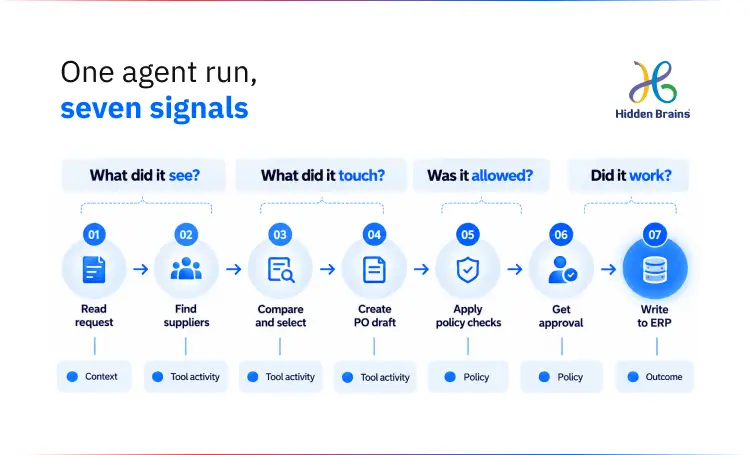
Capture seven signals: inputs and context, reasoning and state, tool activity, output quality, security and policy, cost and performance, and business outcome. Together, they let you explain any single agent action and judge whether the agent is worth running.
| Signal | What to capture | Why it matters |
|---|---|---|
| Inputs and context | User request, system instructions, retrieved documents, conversation history | Detects wrong or stale context and prompt injection |
| Reasoning, decisions and state | Plan, intermediate choices, handoffs between agents, state changes, memory reads and writes | Explains why the agent acted, not just what it did |
| Tool activity | Tool or API name, parameters, response, latency, retries, success or failure | Reveals broken integrations and unsafe actions |
| Output quality | Final answer or action, citations, validation results, user feedback | Connects agent behavior to real quality |
| Security and policy | Permissions checked, blocked actions, sensitive-data exposure, policy decisions | Prevents unauthorized access and compliance failures |
| Cost and performance | Tokens, model and provider, latency, retries, infrastructure cost | Keeps autonomy economically viable |
| Business outcome | Task completed, correct record updated, approval obtained, customer issue resolved | Proves value beyond “the model responded” |
Three of these signals need more care than the table suggests.
Reasoning. Record the plan, tool choices, and handoffs as your orchestration layer logs them. Many models don’t expose their full internal reasoning, and a model’s own explanation isn’t guaranteed to reflect how it reached an output. Treat it as a clue, not as ground truth.
Memory and state. Agent memory and state monitoring means recording what the agent retrieved from memory, what it wrote, and what it overwrote. A stale or corrupted memory entry produces errors that look like model mistakes, and without this record they’re very hard to tell apart.
Inputs. Logging full requests and conversation history puts personal data into your telemetry. Decide what is masked before anything is stored.
Real-world example: instructions slipped in through a public form. In April 2026, Capsule Security disclosed prompt injection flaws in Microsoft Copilot Studio and Salesforce Agentforce that let attackers use public-facing forms to extract sensitive corporate data. Both vendors patched the flaws (OECD.AI incident record). This is why the inputs signal covers everything an agent reads, not just what the user typed.
How Do You Build a Trace That Explains an Agent’s Actions?
A useful agent trace answers five questions:
- What did the user ask?
- What context did the agent use?
- Which tools did it call, with what inputs?
- What did it decide and do?
- Did the action produce the intended result in the target system?
If your traces can’t answer the fifth question, you’re monitoring the model, not the work.
The mechanics of AI agent execution tracking are straightforward. Give every request a trace ID and every conversation a session ID, and record each step as a span under them. Each span carries timing, token usage, tool latency, retry count, and success or failure status. Mask credentials, personal data, and other sensitive fields before telemetry is stored, not after.
OpenTelemetry’s generative AI semantic conventions define standard span types for this, including invoke_agent for an agent run and execute_tool for a tool call, plus attributes for input and output token counts (OpenTelemetry GenAI semantic conventions). The conventions were still in Development status as of mid-2026, so some attribute names may change. Using them anyway keeps your telemetry portable between tools.
Here is what a complete trace looks like for the procurement agent from the introduction (an illustrative workflow, not a client case):
- Request: a buyer asks for a purchase order for 500 units from an approved supplier.
- Supplier-policy retrieval: which policy document was retrieved, and its version and date.
- ERP lookup: the query sent, the supplier code, and the price list returned.
- Budget check: the cost center queried, the remaining budget, and the pass or fail result.
- Draft creation: the drafted order, with the source of each line item’s price.
- Human approval: who approved it, when, and what they saw.
- ERP write: the record created, and a check that it matches the approved draft.
How Do You Debug an AI Agent That Got It Wrong?
Debug an agent by replaying its trace backwards from the wrong outcome until you find the first step whose output was wrong. In the procurement example, a wrong ERP record has four likely causes, and each leaves a different mark in the trace.
| Root cause | What the trace shows | Typical fix |
|---|---|---|
| Retrieval | The policy span returned an outdated or irrelevant document | Fix indexing, freshness rules or retrieval filters |
| Tool parameters | The ERP lookup was called with the wrong supplier code or date range | Tighten tool schemas and validate parameters before the call |
| Model reasoning | Context and tool data were correct, but the draft ignored them | Revise instructions, add a validation step, or test another model |
| Approval gap | The draft reached the ERP write with no recorded approval | Enforce the approval gate in code, not in the prompt |
The last row is the one to worry about most. An agent that can reach a production write without approval has an access-control problem, and the trace only exposed it.
Real-world example: a support agent that invented a policy. In April 2025, users of the code editor Cursor were unexpectedly logged out. When they asked the company’s AI support agent why, it described a company policy that did not exist, and some users reportedly canceled their subscriptions (AI Incident Database). A trace that records which source each answer came from would have shown whether any real policy stood behind this one, before customers acted on it.
Which Agentic AI Evaluation Metrics Actually Matter?
Define what a successful task means in the system where the action lands, then choose one primary outcome metric before adding any diagnostics. “Response generated” and “no errors” don’t qualify. Both can be true while the agent writes the wrong record.
Success looks different in every workflow: a support ticket that is actually resolved, a refund approved correctly within policy, a purchase order that matches contract terms, a code change that passes review and merges. Write that definition down before the agent goes live, because it decides what your telemetry has to prove.
Then pick a single primary metric that leadership can read. Two that work well are successful tasks per 100 requests, and cost per completed task. The first tells you whether the agent works. The second tells you whether it’s worth running.
Diagnostic metrics explain movement in the primary metric:
| Diagnostic metric | What it tells you |
|---|---|
| Tool-call failure rate and retry rate | Whether integrations are reliable, or the agent is fighting them |
| Retrieval relevance or citation coverage | Whether the agent is working from the right information |
| Policy violations and blocked actions | How often the agent tries to act outside its limits |
| Human intervention or escalation rate | How much autonomy the agent has actually earned |
| Latency and token cost per task | Where time and money go inside a task |
| Wrong actions, unfinished work, and incorrect answers | Three different failures with three different fixes, so track them separately |
Resist borrowing alert thresholds from generic guides. A 2% error rate may be fine for a draft email and unacceptable for a payment. Set baselines from a shadow-mode period on your own workflow.

Build Secure, Accountable AI Agents That Deliver More Value
Get ConsultationWhat are the best practices for AI agent logging?
Log structured spans rather than free-text lines, and decide what content gets captured before the first production run. Six practices cover most of the risk:
- Use a standard span format. OpenTelemetry’s generative AI conventions keep traces portable between tools and alongside your existing service telemetry. If your team already traces microservices, the same discipline applies (observability design patterns for microservices).
- Make content capture a deliberate choice. Under the OpenTelemetry conventions, prompt and response content is not recorded by default, and many instrumentations require it to be switched on explicitly. Turn it on per workflow, not globally.
- Redact at the source. Mask credentials, personal data, and payment details inside the agent before telemetry is exported. Redacting downstream means the raw data has already left.
- Separate debug traces from audit records. Debug traces can be short-lived. Audit records need the retention period your regulators or contracts require.
- Sample with intent. Keep every trace that failed, triggered a policy check, or touched a high-risk action. Sample the routine successes.
- Version everything. Record the model, prompt template, and tool versions on each trace, so a behavior change can be tied to a release.
How Do Evaluations and Alerts Turn Traces Into Action?
Traces only help if something reads them. Automated evaluations score agent behavior continuously, and alerts route the problems to a person before customers or auditors find them.
Evaluations run at three levels. A span-level check asks whether one step was right, such as whether retrieval returned a relevant document. A trace-level check asks whether the whole path made sense. A session-level check asks whether the user’s goal was met. Evaluators can be rules, comparisons against reference answers, or a second model acting as a judge. A model judge needs its own calibration against human review, or you’ve only moved the blind spot.
Five alerts cover most production risk:
| Alert | What it usually means |
|---|---|
| A tool fails repeatedly, or its latency crosses a threshold | A broken or degraded integration, or the agent looping on it |
| The agent attempts an action outside its permission scope | A prompt injection, a planning error, or a scope that’s set too loosely |
| Output quality, factuality, or compliance scores fall | Stale data, a model or prompt change, or new input patterns |
| Cost per successful task rises sharply | More retries, longer loops, or a switch to a more expensive model |
| A high-risk action happens without approval (a payment, a deletion, an external message) | An approval gate missing or bypassed. Treat it as an incident. |
Is Observability Enough to Control AI Agents?
No. Observability tells you what happened. Runtime controls decide what is allowed to happen. You need both, and one can’t stand in for the other.
Treat every agent like a new account with system access:
- Give each agent a named owner, a stated purpose, and a defined permission scope.
- Give each agent its own identity. Never share administrator credentials between agents.
- Separate read, write, and approval rights, so drafting an action and approving it are different permissions.
- Recheck authorization when an action executes, not only when the agent is deployed.
Teams that already run access reviews for privileged human accounts can extend the same reviews to agent identities. The security side of this is covered in more depth in our guide to AI agents in cybersecurity.
Keep an audit record for every consequential action. It should hold the original request, the evidence the agent used, the model and tool versions, the approvals given, the actions taken, and the results in the target system. A generated explanation on its own is not an audit trail. It is the agent’s account of itself, not evidence of what happened.
Make Your AI Agents Observable and Auditable.
Talk to Our Experts
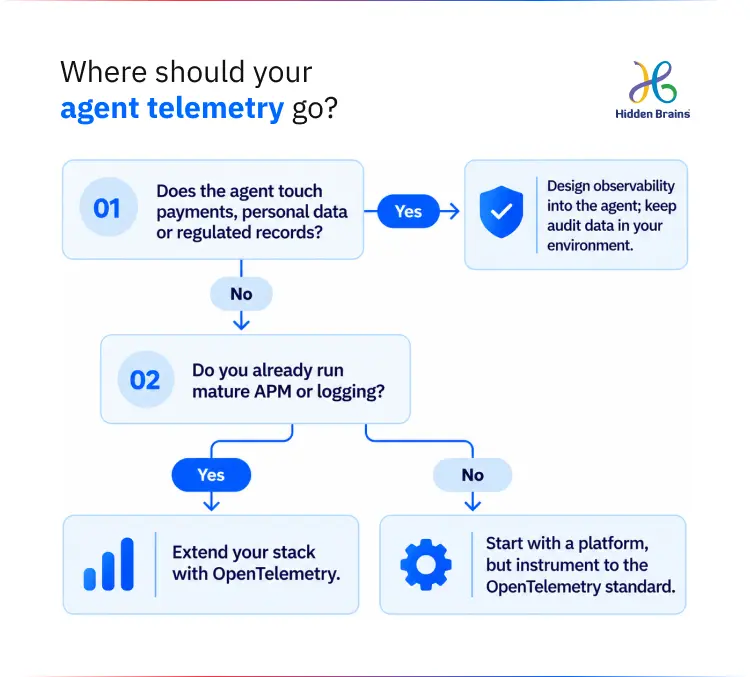
Should you build, buy, or standardize an enterprise AI agent observability platform?
Most teams end up combining all three: instrument the agent to a standard, then send that telemetry to a platform or to the observability stack they already run. The real decision is where to start.
| Approach | Best fit | Trade-offs |
|---|---|---|
| A dedicated agent observability platform | A fast start, small teams, and built-in evaluation and dashboards | Pricing per trace adds up at volume; data leaves your environment unless self-hosted; switching vendors later can mean re-instrumenting |
| Extend your existing observability stack with OpenTelemetry | Teams already running mature APM and logging who want one incident view | More engineering to build agent-specific views and evaluations |
| Observability designed into the agent | High-risk or regulated workflows, and outcome checks against business systems | Needs design effort up front; still exports to a platform or stack |
Our view: for most mid-market teams, the safest default is to instrument inside the agent using OpenTelemetry conventions, then choose where the data goes. That keeps the expensive part, the instrumentation, independent of any one vendor.
It is also the default we use in custom AI agent development work, because observability tooling often changes over an agent’s life while the instrumentation stays.
How do you roll out AI agent observability in six steps?
Start narrow, prove it on one workflow, and only then give agents more autonomy. This sequence is how to monitor autonomous AI agents without slowing delivery to a crawl:
- Instrument one high-value workflow end to end. Full tracing plus outcome tracking, on a single workflow where a wrong action has a real cost.
- Run in shadow or test mode first. Let the agent act on copies or drafts before it can change production systems. Use this period to set your baselines.
- Require human review for consequential actions. In early deployment, a person approves anything that moves money, deletes data, or contacts a customer.
- Expand autonomy only after tests pass. Quality, failure handling, and permission tests all need to pass before an approval gate is removed.
- Review traces weekly. Look for recurring tool failures, unnecessary steps, stale context, and cost outliers. Most improvements come from this review, not from alerts.
- Connect agent telemetry to the rest of your operations. Feed it into your application, infrastructure, security, and service-management tools so an incident shows the whole picture, not just the agent’s part.
Why should observability be planned before the first agent ships?
Because the decisions that make an agent observable are made at design time. Adding observability later means retrofitting trace IDs into code paths, reverse-engineering what “success” meant, and discovering which permissions the agent already has. Three questions belong in the first week of any agent project:
- What does a correct outcome look like in the target system, and how will we check it automatically?
- What is this agent allowed to do, and which actions need human approval?
- What will we capture, what will we mask, and who reviews the traces?
This is where an agent build and its observability stop being separate projects. When Hidden Brains scopes AI agent development services, the outcome metric, permission scope, and trace design are defined alongside the workflow, before the first line of agent code.
Our CMMI Level 3 and ISO/IEC 27001:2022 certified delivery practices apply the same discipline to agents that they apply to any system with access to business data.
For agents already in production, the work usually starts with an audit of what is logged today against the seven signals above. From there, the gaps feed into ongoing MLOps and model monitoring. If your team needs the skills rather than a project, you can hire AI agent engineers to work inside your delivery structure. For the wider context of where agents fit in enterprise operations, see our guide to agentic AI for the enterprise.
Frequently Asked Questions
What is the difference between AI agent monitoring and AI agent observability?
AI agent monitoring tracks known indicators, such as latency, errors, and cost, against thresholds. AI agent observability captures enough detail about each run (context, decisions, tool calls, and outcomes) to explain failures nobody predicted. Monitoring tells you something is wrong. Observability tells you why.
How do you monitor autonomous AI agents in production?
Give every request a trace ID and record each step as a span: inputs, retrieved context, tool calls, decisions, and the final result in the target system. Define one primary outcome metric, add diagnostic metrics and alerts, and review traces weekly. Start with one workflow in shadow mode before granting more autonomy.
How do you track an AI agent’s memory and state?
Record every memory read, write, and overwrite as part of the trace, with what was stored and when. This lets you tell a model error apart from an agent acting on stale or corrupted memory, which otherwise look identical in the output.
Does logging AI agent activity create privacy risk?
Yes. Prompts, conversation history, and tool responses often contain personal or confidential data. Mask sensitive fields inside the agent before telemetry is exported, enable content capture per workflow rather than globally, and keep audit records separate from short-lived debug traces.
How do you stop an AI agent from looping or running up costs?
Alert on repeated tool failures, unusual retry counts, and sharp rises in cost per successful task. Pair those alerts with hard runtime limits, such as a maximum number of steps or tool calls per task, so a loop is stopped rather than only reported.
Do you need a separate platform for AI agent observability?
Not necessarily. Teams with mature application monitoring can extend their existing stack using OpenTelemetry’s generative AI conventions. A dedicated platform is faster to start with. Either way, instrumenting to an open standard keeps you free to switch later.
When should observability be planned in an AI agent project?
At design time, before the first line of agent code. The outcome definition, permission scope, and trace design all shape how the agent is built, and retrofitting them after launch is slower and leaves gaps.

Conclusion
You wouldn’t give a new employee access to your ERP, payment systems, and customer records without clear objectives, limited permissions, visible work, and someone checking the results. You’d extend their authority as they earned it.
Agents deserve the same treatment. The goal isn’t to watch every token. It’s to be able to show that each agent action was authorized, explainable, effective, and worth what it cost. Teams that can show that will move agents from pilot to production. Teams that can’t will keep running pilots.