













































































Summary
- Legacy decisions should be driven by business value and risk, not system age.
- Assess each application individually to determine whether to keep, modernize, or replace.
- A structured scorecard turns modernization debates into clear, defensible decisions.
- Modernization delivers value by reducing technical debt, improving agility, and enabling AI readiness.
- Successful transformation depends on process clarity, data readiness, and phased execution.
- Not every legacy system needs modernization; focus investment where it creates the most impact.
- The right strategy is to simplify the portfolio and build a foundation for future growth.
Enterprises are pouring money into systems that no longer move them forward. McKinsey estimates that technical debt equals 20 to 40 percent of an organization’s entire technology estate value before depreciation, and that CIOs divert 10 to 20 percent of their new-product budget just to service it. Reclaiming that “tech equity” is the real prize behind every legacy decision.
That is money spent standing still, and most legacy decisions fail to recover it for the same reason: teams argue about the technology instead of scoring the system. A system being old is not a problem. A system being unpatchable, blocking your roadmap, or costing more to run than it returns is the problem. The same question surfaces in nearly every enterprise software development services engagement we run: modernize it, replace it, or leave it alone?
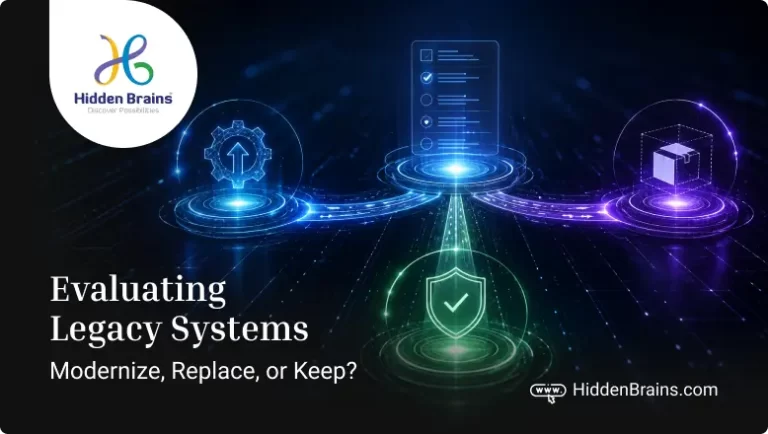
This guide provides a structured way to make legacy system decisions based on evidence rather than assumptions. By evaluating each application across six key factors, you can determine the right path forward: keep, modernize, or replace.
A successful legacy modernization strategy is not simply about upgrading technology; it is about reducing technical debt, improving business agility, lowering operational risk, and eliminating the hidden costs of outdated systems that organizations often continue to absorb over time.
| Details | Information |
|---|---|
| Guide Focus | How enterprises can decide whether to keep, modernize, replace, or retire legacy systems using a structured assessment framework. The guide covers legacy identification, modernization strategies, six-factor scoring, decision criteria, cost considerations, AI readiness, and transformation approaches. |
| Business Challenge | Organizations are spending significant resources maintaining legacy systems that limit agility, increase technical debt, create security risks, and slow adoption of cloud, automation, and AI. The challenge is deciding where modernization investment will create the highest business value. |
| Target Audience | CIOs, CTOs, IT leaders, enterprise architects, application owners, business leaders, transformation teams, engineering leaders, and organizations planning legacy application modernization. |
| TL;DR | Legacy modernization is not about replacing old systems; it is about making the right decision for each application. Enterprises should assess systems based on business value, technical health, risk, cost, and future readiness to determine whether to keep, modernize, or replace them. |
| Key Evaluation Criteria | Business value and strategic fit, technical health, performance and reliability, integration and data readiness, security and compliance, total cost of ownership, modernization feasibility, risk impact, future scalability, AI and automation readiness, and alignment with business goals. |
What Actually Makes a System “Legacy”?
A legacy system is any application whose technology, architecture, or operations now create more business risk or cost than the value it delivers, regardless of its age. Age is a weak signal. A well-documented 12-year-old application that runs a stable process at low cost is not a problem worth solving. A three-year-old application built on an unsupported framework, with no test coverage and one engineer who understands it, is a live risk.
The signs that usually matter are practical: releases that used to take days now take weeks, integrations that break whenever something upstream changes, security or compliance gaps you cannot close without major surgery, a growing bill for scarce skills in an old stack, and initiatives that stall because the system cannot support them. When you find yourself scheduling around a system rather than through it, it has become legacy in the sense that counts.
For a wider view of how aging platforms hold back digital initiatives, see our take on legacy platform transformation in the digital era.
Quick rule: “Old” is not a reason to replace. Unpatchable, unsupported, or blocking your roadmap is.
The Right Question Isn’t Whether to Modernize or Replace—It’s Where to Start and Why
Enterprises rarely have one legacy system. They have a portfolio, and the right answer differs for each application in it. The mistake is applying a single verdict across the estate, either freezing everything because replacement feels risky, or ripping everything out because the stack looks dated. Both waste money.
A better approach evaluates each system on its own merits and produces one of three outcomes.
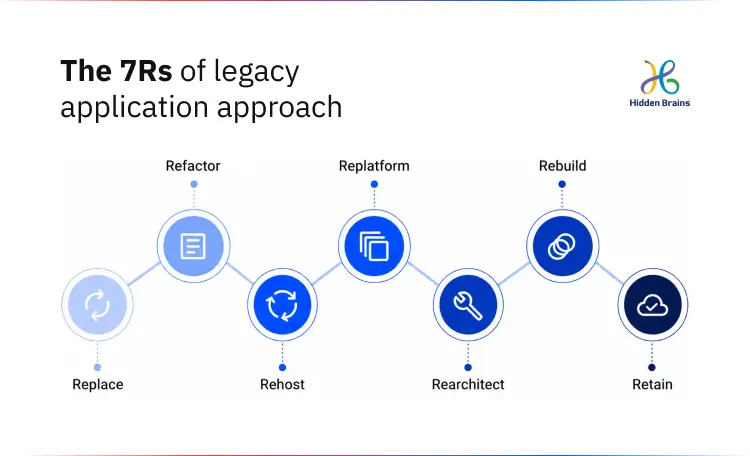
The industry’s well-known frameworks (the six or seven “Rs” of rehost, replatform, refactor, rearchitect, replace, retire, and retain) describe how you change a system. They do not tell you which systems deserve which treatment. That is the gap this framework closes.
Know Which Systems to Modernize, Replace, or Retire.
Book Assessment Call
The Legacy System Decision Scorecard: Six Factors That Define the Right Path
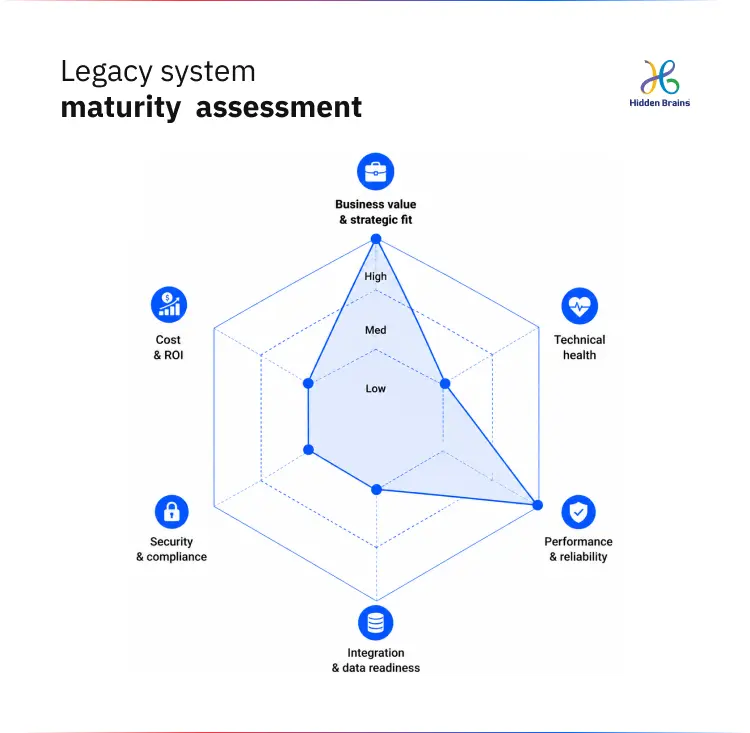
Before choosing a move, rate each application Low, Medium, or High on six dimensions. This turns a subjective debate into a comparable score you can defend to a board.
| Dimension | What you assess | Rating |
|---|---|---|
| Business value & strategic fit | Criticality to revenue and operations, impact of one day or one week of downtime, whether the logic is differentiated or a commodity, fit with your future operating model (cloud, AI, real-time, multi-region) | Low / Med / High |
| Technical health | End-of-life technology, code complexity and coupling, change-failure and rollback rates, test coverage, documentation quality, key-person dependency | Low / Med / High |
| Performance & reliability | Response time and throughput, ability to scale with users and data, uptime and incident history, recovery objectives (RTO/RPO) | Low / Med / High |
| Integration & data readiness | Number and type of integrations, API and event readiness for AI and automation, data quality and governance, data residency and regulatory constraints | Low / Med / High |
| Security & compliance | Known vulnerabilities, compliance gaps, logging, auditing and access controls, ease of meeting future regulatory requirements | Low / Med / High |
| Cost & ROI | Total cost of ownership, the split between maintenance and innovation spend, the cost and timeline to keep vs modernize vs replace, and the business initiatives the system currently blocks | Low / Med / High |
Two of the ten assessment areas are not scored directly; they help shape the final decision.
- Skills and future fit evaluate whether your organization has (or can build or acquire) the capabilities needed to support the target technology environment. This helps determine whether the recommended path is realistic and achievable.
- Risk and criticality measure the potential impact of failures, including outages, security issues, compliance risks, or business disruptions. This becomes the overall risk rating: Low, Medium, High, or Red.
By combining business value with risk level, organizations can make a clearer decision on whether to keep, modernize, replace, or retire a system.
Quick rule: High value + good fit → lean toward modernize or keep (depending on tech risk). Low value or poor fit → strong candidate for replace/retire, or repurchase with SaaS.
Mapping System Scores to the Right Transformation Strategy
Once a system is scored, the decision usually resolves cleanly. The table below is the one to keep in front of you.
| Option | When it fits | Typical signals |
|---|---|---|
| Keep (Retain / Maintain) | The system is stable, secure, and still aligned with business needs; changing it would cost more than it is worth right now. | No major incidents or security gaps · Low change demand · Well understood, documented, and supported · Not blocking key initiatives |
| Modernize (Refactor / Replatform / Re-architect) | The business logic is valuable, but the technology, architecture, or operations create avoidable risk, cost, or friction. | Hard to change, slow releases, brittle integrations · Security or compliance gaps fixable without a full rewrite · Performance or scalability limits while the core process is still sound · You need incremental progress, not a big-bang cutover |
| Replace (Rebuild / Repurchase / Retire) | The system itself is the bottleneck for your future operating model; keeping it would lock in constraints you cannot accept. | End-of-life, unpatchable, or unsupported technology · Architecture cannot support cloud, AI, or real-time needs · High total cost of ownership vs modern alternatives · The function is now standardized and better served by SaaS (retire when the capability is redundant or no longer used) |
Quick rule: If the business logic still holds but the technology is the problem, that is a modernize signal, not a replace one.
A few distinctions save real money here. Keeping a system is a legitimate, active decision, not neglect; it means you have judged that stability outweighs change right now, and you will revisit it. Modernizing preserves the process while fixing the technology underneath it, often incrementally, using patterns like the strangler approach so you never face a single high-risk cutover. Replacing is warranted when the system, not just its technology, is the constraint, and retiring applies when a capability has become redundant or is no longer used at all.
Quick rule: If the capability is now a commodity (payroll, ticketing, basic CRM), buying usually beats rebuilding.
Convert Your Legacy Scorecard Into Actionable Decisions
Talk to Our ExpertsUnderstanding the Cost and Timeline of Legacy Modernization
There is no single price, because cost tracks the depth of change, not the age of the system. As a directional guide: rehosting or a light replatform is the fastest and least expensive path and can move in weeks to a few months; refactoring and re-architecting sit in the middle and typically run across quarters; a full rebuild or platform replacement is the largest commitment and is planned in quarters to more than a year, depending on data volume, integrations, and compliance scope.
The more useful number is the cost of not deciding. If, as McKinsey reports, a fifth of your new-product budget is already being pulled into servicing technical debt, that is a recurring, invisible tax that a one-time modernization is often designed to eliminate. Build the business case on that trade, not on the sticker price alone.
Quick rule: Compare modernization against the annual run cost of the status quo, not against zero.
Software Modernization: The Rewards, Risks, and Road Ahead
- Modernization done right: Lower cost of change, faster releases, fewer defects, cleaner integrations, stronger security, and architecture ready for automation and AI.
- Modernization done wrong: Higher complexity, delayed outcomes, and technology changes that fail to address business needs.
- Successful modernization: Teams build on the system instead of working around its limitations.
- Failed modernization: Organizations simply recreate old problems on new technology.
- Strategic modernization: Prioritizes data migration, change management, and business process clarity.
- Poor modernization: Focuses only on technology migration while underestimating organizational and operational challenges.
- Phased modernization: Reduces risk, delivers incremental value, and enables continuous improvement.
- Big-bang replacement: Creates higher disruption risk and greater chances of failure.
- Process-led modernization: Fixes business processes before transforming technology.
- Technology-first modernization: Makes inefficient processes run faster without solving the underlying issues.
How Hidden Brains Helps Modernize Legacy Systems
At Hidden Brains, modernization work usually starts before any technology is chosen, with the assessment above and time spent understanding how the system is actually used. Two projects show what the different verdicts look like in practice.
A modernization decision: a 40-year backyard-and-pool-services provider. The client ran a 10-plus-year-old system they had outgrown, with poor usability and little operational insight across three service lines and roughly 7,500 monthly work orders. The business logic was sound, so this was a modernization, not a teardown. Our team spent three days on site, including visits to six service locations, to map the real process before writing code, then built an interactive web portal and a field mobile app with automated work-order generation, Zoho Books and CRM integration, geofencing, and role-based access. After a phased data migration, the system went live in mid-2020 and now processes around 250 work orders and 30 automated invoices a day, with QA work orders auto-selected by an intelligent algorithm.
A replace-and-replatform decision: Scosche, a US consumer-tech brand. Scosche’s storefront ran on Magento 1 Enterprise, which was heading to end of life, an unambiguous signal that keeping the platform was not an option. This was a platform replacement: a migration from Magento 1 EE to Magento 2 EE, plus a move from AWS to Magento Cloud, for a store with 50,000-plus users, 200-plus daily orders, and millions of records to migrate. The work reduced dependency on 100-plus third-party extensions by half, completed the data migration with full accuracy, and delivered a measurable traffic and governance improvement with no slippage against the planned timeline. The Scosche Magento migration case study covers the approach and results.
The common thread is that the verdict came from the system’s own profile, not from a preference for building or buying. That is the difference our software modernization services are built around: decide with evidence, then execute in phases you can control.
Frequently Asked Questions
How much does legacy system modernization cost?
Cost tracks the depth of change, not the age of the system. Rehosting or a light replatform is the least expensive path; refactoring and re-architecting cost more; a full rebuild or platform replacement is the largest commitment. The more important figure is the annual run cost and technical-debt tax of keeping the system as-is, which modernization is often designed to remove.
What are the signs that a legacy system needs modernization?
Slow releases, brittle integrations that break on upstream change, security or compliance gaps you cannot close without major work, rising costs for scarce skills in an old stack, and strategic initiatives that stall because the system cannot support them. If teams schedule around a system rather than through it, it needs attention.
How long does enterprise software modernization take?
A light rehost, or replatform, can move in weeks to a few months. Refactoring and re-architecting typically run across quarters. Full replacements are planned in quarters to more than a year, driven mainly by data volume, integration count, and compliance scope, not by the code itself.
What technologies are used for application modernization?
Common building blocks include cloud infrastructure and managed platforms, containers and orchestration, API and event layers to connect systems, microservices where they earn their complexity, modern data pipelines, and automated testing and CI/CD to make change safe. The right set depends on the target architecture, not on trend.
How do you modernize legacy applications?
Assess and score the system, confirm the business process it supports, then choose an approach: replatform to reduce operational friction, refactor or re-architect to fix structural limits, or rebuild where the core cannot be salvaged. Favor phased, incremental delivery (such as the strangler approach) over a single high-risk cutover, and treat data migration and change management as first-class work.
What are the advantages of software modernization?
Lower cost of change, faster and safer releases, cleaner integrations, a stronger security and compliance posture, and an architecture that can support automation and AI rather than block them. The benefits show up as operational gains before technical ones.
When should a company retire a legacy application?
Retire an application when the capability it provides is redundant, no longer used, or fully covered by another system. The main risk in retirement is hidden dependencies and users, so map them before decommissioning.
Is it better to modernize or replace a legacy system?
Modernize when the business logic is still valuable and only the technology, architecture, or operations are causing problems. Replace when the system itself, not just its technology, is the bottleneck, or when it is end-of-life and a modern platform or SaaS product serves the function better.


Conclusion
Run the scorecard across your portfolio, and the right path becomes clearer. High-value systems with strong business logic and manageable risk can be retained or modernized. Low-value, high-risk, or end-of-life systems can move toward replacement or retirement.
The value is not in the labels; it is in replacing endless modernize vs. replace debates with a defensible, system-by-system strategy that leadership can approve and engineering teams can execute.
The urgency has increased with AI. Legacy systems and fragmented data are no longer just technical debt; they are becoming barriers to scaling automation, innovation, and enterprise AI.
The organizations that act now will build on a stronger foundation, while others continue working around the limitations of their own software.
Find out where your legacy systems stand. Book a free 2-hour modernization consultation and get a clear path forward.