













Summary
- The biggest cost isn’t software. It’s the manual work between systems.
- Poor data quality costs organizations $12.9M a year on average.
- Six cost lines show what fragmentation really costs you.
- UAE e-invoicing (January 2027) turns bad data into rejected invoices.
- Integrate first, automate next, and add AI last.
- Order-to-cash delivers the fastest returns.
Most enterprises have plenty of customer data. What they lack is one shared version of it, and that gap is the work customer operations automation promises to remove but often cannot. Gartner research puts the average cost of poor data quality at $12.9 million a year per organization, and found that 59% of organizations don’t measure it at all.
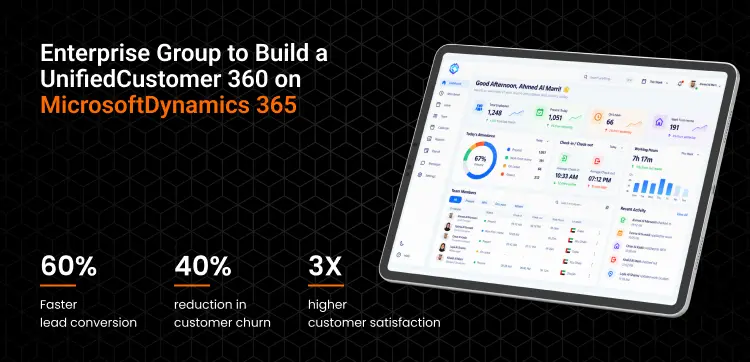
We saw this in a Customer 360 program for a multi-business-unit enterprise group in the Middle East. Data sat across fragmented CRMs, legacy applications, and spreadsheets, and departments calculated the same KPIs differently, so teams reconciled numbers before they could act. After consolidating customer context around Microsoft Dynamics 365, the group reported 60% faster lead conversion and 40% lower churn.
Automation did not create that result. Connecting the data first did, which is why enterprise automation pays back only when the systems underneath agree.
This article shows where disconnected systems leak time and money, how to measure it, and why UAE and Saudi enterprises now face a deadline to fix it.
What Does “Disconnected” Actually Mean in Customer Operations?
Customer operations are disconnected when a single customer journey depends on two or more systems that do not exchange data automatically, so a person has to move, check, or re-enter it. The simplest test: count how many times one customer’s details are typed in from the first enquiry to the final payment.
Most customer operations fall into four journeys. Each crosses several systems, and each has a predictable breaking point.
| Journey | Systems usually involved | Where the handoff breaks |
|---|---|---|
| Lead to order | Website forms, CRM, quotation tool, pricing spreadsheet | Sales re-keys the approved quote into the ERP; prices and discounts drift between versions |
| Order to cash | CRM, ERP, warehouse or transport system, billing, payment gateway | Proof of delivery does not reach billing, so invoices go out late or with the wrong details |
| Onboarding and KYC | CRM, document storage, compliance checks, core system | Trade license, VAT TRN and contact details are captured more than once; expiry dates are tracked by hand |
| Service to resolution | Contact center, WhatsApp Business, email, ticketing, ERP | Agents cannot see order, invoice or delivery status without switching screens; customers repeat themselves |
Disconnected does not mean old. A company running modern cloud tools can be just as fragmented as one on a 15-year-old ERP if nothing connects them. In the Gulf, the pattern is often sharper: a group with mainland and free zone entities may run separate CRM or accounting instances per entity, and customers who move between them appear as different records.
Turn Integration Inefficiencies Into a Measurable Modernization.
Get Your Assessment
Where The Hidden Costs Of Fragmented Software Systems Come From
The costs stay hidden because they are spread across salaries, delays, and lost customers rather than appearing as one line in the IT budget. The scale of the problem is well documented. Gartner estimates that poor data quality costs organizations an average of $12.9 million a year, yet 59% of organizations do not measure that cost at all. In IBM’s 2025 Chief Data Officer Study of 1,700 data leaders, 83% said data silos hinder innovation and slow real-time decision-making.
Those figures describe the IT side. The operational side shows up in five places.
Swivel-chair work and duplicate data entry
Swivel-chair work is any task where an employee reads data in one system and types it into another. It is rarely anyone’s full job, which is why it is rarely measured. A coordinator who spends 40 minutes a day copying delivery confirmations into billing does not appear on any report, but across a team and a year it becomes a headcount.
Reconciliation delays and decisions made on old numbers
When CRM, ERP, and billing each hold their own version of a customer, someone has to reconcile them. Month-end closes stretch, credit teams chase payments against invoices that sales has already amended, and management reviews numbers that were accurate last week. Reporting then explains what happened instead of supporting what to do next.
Errors, rework and disputed invoices
Every manual transfer is a chance for a wrong price, a wrong TRN, or a missed discount. The cost is not the typo. It is the credit note, the re-issued invoice, the delayed payment, and the account manager’s time spent apologizing.
The impact of disconnected systems on customer experience
Customers experience fragmentation as inconsistency. They give the same information twice, receive different answers from sales and support, and wait while an agent checks another screen. For B2B accounts in logistics, distribution, or real estate, where relationships are long, and renewals are negotiated, that friction shows up later as lost share of wallet rather than an immediate complaint.
Compliance and audit exposure
When customer data is copied across five systems, it is harder to prove which version is correct, who changed it, and where personal data sits. That matters more in the GCC now than it did three years ago, for reasons covered below.
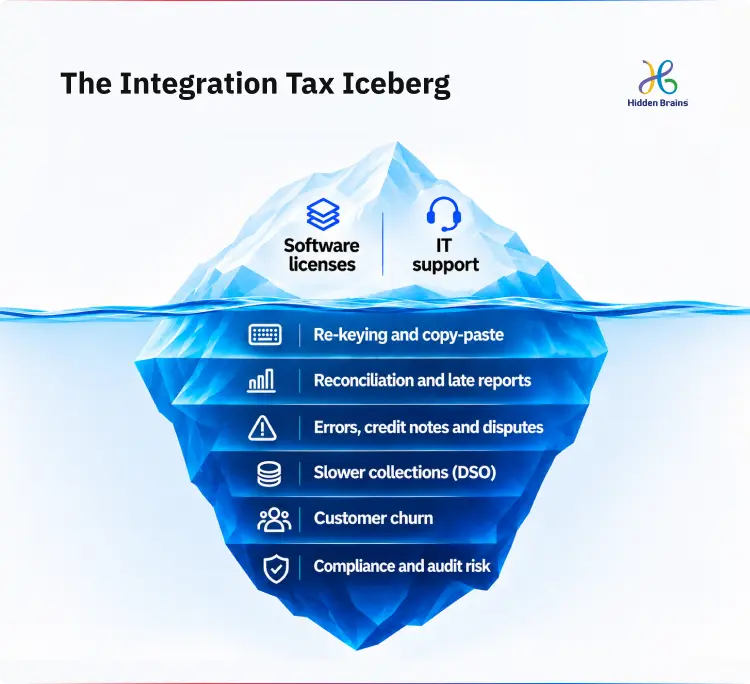
How To Measure The Cost Before You Fix It
You can put a number on disconnected systems by counting six things: time spent moving data, reconciliation effort, cash delayed, errors, extra service time, and revenue at risk. Most of the data already sits in your ERP, contact center reports, and finance close checklist. What is usually missing is someone adding it up.
Use the worksheet below as a baseline. Be conservative; a defensible lower number persuades a board more than an inflated one.
| Cost bucket | What to count | How to calculate (annual) | Where the data lives |
|---|---|---|---|
| Manual transfer time | Tasks where staff re-key or copy data between systems | Hours per week × loaded hourly cost × 52 | Two-week time sampling with team leads |
| Reconciliation effort | Hours spent matching CRM, ERP, and billing records | Hours per close × loaded hourly cost × 12 | Finance close checklist |
| Cash delayed | Days between delivery and invoice, plus days added by disputes | Extra days × (annual revenue ÷ 365) × cost of capital | ERP delivery and invoice dates, DSO trend |
| Errors and rework | Credit notes, re-issued invoices and wrong shipments caused by data mismatch | Incidents × average handling cost, plus value written off | ERP credit notes, ticket tags |
| Extra service time | Handling time added when agents switch between systems | Extra minutes per contact × contacts per year × agent cost per minute | Contact center reports |
| Revenue at risk | Accounts lost or reduced where service friction was a factor | Annual revenue of those accounts | CRM churn reasons, account reviews |
The total is your integration tax. It also solves the hardest part of measuring ROI of customer ops automation: once you have a baseline, ROI becomes a before-and-after comparison on the same six lines instead of a vendor’s estimate.
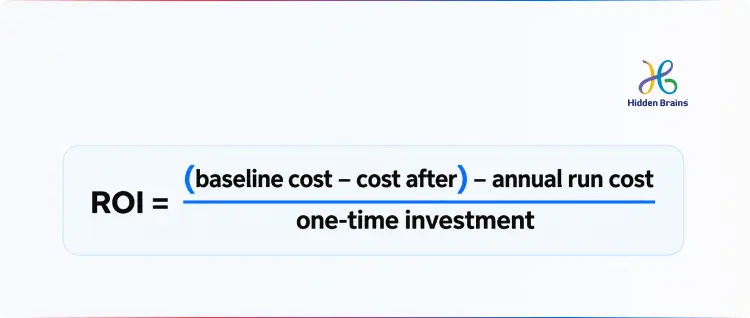
This is what happened in the Customer 360 program described at the start. Before the Customer 360 transformation around Microsoft Dynamics 365, the cost sat mainly in two lines of this worksheet: reconciliation effort, because teams reconciled KPIs before acting, and revenue at risk. After that, the results showed up in exactly those areas: lead conversion 60% faster, churn down 40%.
Why GCC Enterprises Are Feeling This Sooner: The 2026 To 2027 Compliance Clock
In the UAE and Saudi Arabia, e-invoicing and data protection rules are turning disconnected customer data from an efficiency problem into a compliance deadline. An invoice built from a CRM record, a spreadsheet price, and a manually typed TRN was an inconvenience. Under structured e-invoicing, it becomes a rejected invoice.
UAE e-invoicing
The UAE Ministry of Finance has announced a phased rollout of mandatory e-invoicing, which applies to businesses regardless of VAT registration status unless legislation excludes them (KPMG).
| Phase | Who | Appoint an Accredited Service Provider by | Mandatory from |
|---|---|---|---|
| 1 | Businesses with annual revenue of AED 50 million or more | 30 October 2026 | 1 January 2027 |
| 2 | Businesses with annual revenue below AED 50 million | 31 March 2027 | 1 July 2027 |
| 3 | Government entities | 31 March 2027 | 1 October 2027 |
For Phase 1 businesses, the provider deadline has already passed, and go-live is weeks away. The provider handles transmission, but it cannot fix the source data. If customer master data lives in the CRM, pricing in a spreadsheet, and invoices in the ERP, every mismatch now surfaces as a compliance failure instead of a quiet correction.
Saudi Arabia: ZATCA Phase 2
In Saudi Arabia, ZATCA’s integration phase requires VAT-registered businesses to connect their invoicing systems to the Fatoora platform, generating XML invoices with QR codes, UUIDs, and cryptographic stamps. It has rolled out in waves by revenue size, moving from larger taxpayers toward SMEs (VATupdate). Groups that met the requirement with a bolt-on to an older ERP often find the invoice is compliant while the data feeding it is still re-keyed upstream.
Data protection on both sides of the border
The UAE’s Federal Decree-Law No. 45 of 2021 (PDPL) gives individuals rights to access, correct, erase, and port their personal data, and controllers generally have one month to respond. DIFC and ADGM keep their own data protection regimes. Saudi Arabia’s PDPL became fully enforceable on 14 September 2024 and requires written records of processing, enforced by SDAIA (Clyde & Co).
The practical issue is simple: you cannot correct or erase a customer’s data on time if you do not know which systems hold a copy.
Regional Operating Realities
A few patterns make fragmentation more expensive in the Gulf than the global averages suggest:
- Multi-entity structures. Mainland and free zone entities often run separate systems, so one customer becomes several records.
- Arabic and English records. The same name transliterated differently creates duplicates that simple matching misses.
- WhatsApp-first customers. Conversations that never reach the CRM leave service history scattered across personal phones.
- Long-lived on-premise ERPs. Many Saudi groups run customized ERPs that predate modern APIs, which makes legacy system modernization in Saudi Arabia an integration question as much as a replacement one.
This is where enterprise software integration in the UAE has moved from an IT project to an operating requirement.

Stop Losing Revenue to Disconnected Systems.
Map Your Integration GapsEnterprise Application Integration Best Practices: Connect Before You Automate
Integration makes systems share the same data; automation makes work move without a person pushing it. Integration has to come first, because automating a broken handoff only makes it fail faster and at greater volume.
The practices that matter most in customer operations:
- Name one system of record per data entity. Decide where the master customer, product, price, order, and invoice live. Every other system reads from that source or writes back to it through a defined route.
- Clean master data before connecting it. Remove duplicates, match Arabic and English variants of names, and validate TRNs and trade license numbers. Connecting dirty data spreads it faster.
- Integrate through a layer, not a web of direct links. A middleware or API layer gives you one place to monitor, change, and secure data flows.
- Design for exceptions. Decide what happens when a message fails, a record conflicts, or a system is down: retries, alerts, and a named queue for a human to resolve.
- Carry governance with the data. Role-based access, encryption in transit, audit logs and consent flags should travel with the record, which is what PDPL compliance needs in practice.
- Give every integration an owner. An integration nobody owns is the next disconnected system.
The architecture choice depends on how many systems you have, how old they are, and how fast data needs to move.
| Approach | Best fit | Cost as you add systems | Typical failure mode | Governance |
|---|---|---|---|---|
| Point-to-point | Two or three systems, one clear flow | Rises sharply; each new system adds connections to all the others | Breaks silently when one side changes | Hard: logic scattered across scripts |
| Middleware / iPaaS | A mid-size estate with many cloud tools | Moderate: subscription plus connectors | Prebuilt connectors fall short for custom or legacy systems | Central monitoring |
| API-led | Enterprises with a legacy core and many channels | Higher upfront, lower for each new channel | Over-engineering when the estate is small | Strong: reusable, versioned APIs |
| Event-driven | High-volume, real-time status such as orders and shipments | Efficient at scale | Harder to trace and debug | Needs strict event schema discipline |
Many GCC estates end up hybrid: API-led for the ERP core, often after some legacy software modernization to expose clean APIs, and iPaaS connectors for cloud tools.
How To Automate Customer Operations Workflows, In The Right Order
Automate customer operations workflows in six steps: map the journey, fix data ownership, build the integration layer, automate with exception handling, measure against the baseline, then add AI where it has connected context. Skipping to step four is the most common and most expensive mistake.
- Map one journey end to end. Pick the journey with the highest integration tax from your worksheet, usually order to cash or service to resolution. Document every handoff, system, and person involved as it actually runs, not as the process manual says.
- Fix data ownership. For each handoff, confirm the system of record and remove steps that exist only to copy data. Some steps disappear entirely at this stage.
- Build the integration layer. Connect the systems in that journey through APIs or middleware so status, customer, and invoice data flow without re-keying.
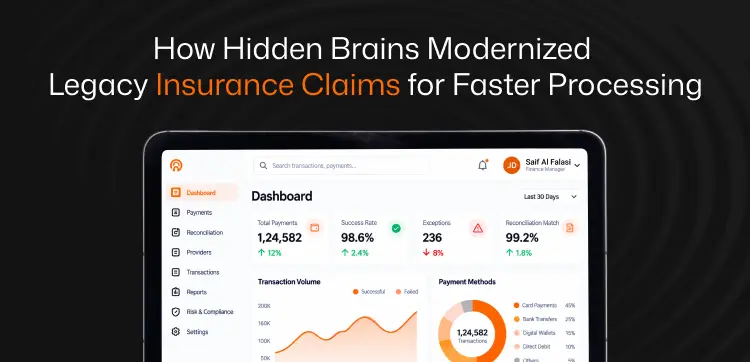
- Automate the workflow, including its exceptions. Now apply workflow automation, whether a BPM suite, an iPaaS workflow engine, or the automation inside your CRM or ERP. Workflow automation enterprise software only works on data it can reach, which is why steps two and three come first. Define who handles each exception and how fast. A GCC insurance group shows why exceptions matter: claim handlers were switching between policy systems, claims applications, documents, and email to understand a single case, and growing volumes pushed more cases into manual review. Modernizing the claims workflow while live operations continued cut claims turnaround by 38% and manual claims-review effort by 41% (insurance claims modernization case study).
- Measure against the baseline. Re-run the six-line worksheet after 90 days. Report the change on the same lines, so the result is comparable.
- Add AI where context now exists. Once order, invoice, and service data are connected, AI agents can answer status queries, classify incoming emails, or draft follow-ups with accurate context. On top of disconnected systems, the same agent gives confident answers from incomplete data. This is the difference between AI that talks and AI built through enterprise AI development services that understands business context and triggers the next action. triggers the next action.
Integrate, Modernize or Replace? A Decision Table
Integrate around a system when it is stable and fit for purpose. Modernize it when the business logic is sound but the technology blocks integration. Replace it when the process itself has outgrown the system.
| Option | Choose it when | Watch out for | Sensible first step |
|---|---|---|---|
| Integrate around it | The system is stable, supported, and offers usable APIs or data access; the pain is in the handoffs | Wrapping a system that is due to be retired | Map one journey and expose its key data through APIs |
| Modernize it | The logic is sound and heavily customized, but old technology, scarce skills, or security gaps block integration | Scope creep into a full rewrite | Decide module by module what to refactor, what to wrap and what to retire |
| Replace it | The process has outgrown the system: multi-entity operations, Arabic support, or e-invoicing it cannot handle, or the vendor is ending support | Rebuilding old processes in new software; underestimating data migration | Redesign the process before selecting software |
The cheapest answer is rarely “replace everything“, and the riskiest is “integrate around everything“. Most enterprises need a mix, decided system by system. A multi-specialty hospital group in the Gulf integrated around its core instead of replacing it. An API-led layer connected appointments, reminders, reports, and billing into one web and mobile journey while its clinical systems stayed live. The result was 50% higher patient engagement, 30% fewer readmissions, and 3X operational efficiency.
What The Right Enterprise System Integration Partner Delivers In The UAE And Saudi Arabia
The right partner does more than connect systems. It gives you one trusted version of the customer, frees your teams from re-keying, and builds a foundation that keeps working as you add channels, entities, and AI. In practice, that value shows up in six ways:
- A clear view of where the money leaks. Discovery maps your customer journeys and puts a number on the integration tax before any build begins, so investment goes to the handoffs that cost the most.
- One customer record across teams. Sales, service, finance, and operations work from the same customer, order, and invoice data, so reports stop needing reconciliation.
- Integrations built for your estate, not a template. Prebuilt connectors where they fit, custom APIs where legacy CRM and ERP systems need them, and an architecture that does not need rebuilding when the next system arrives.
- Compliance designed in. UAE and Saudi PDPL, DIFC and ADGM requirements, audit trails, and e-invoicing readiness are part of the design, not a retrofit before the deadline.
- Modernization without disruption. Phased delivery keeps business-critical systems running while they are connected or upgraded.
- Ownership after go-live. Monitoring, defined response times, and support across both working weeks, Saturday to Sunday for most UAE businesses and Friday to Saturday in Saudi Arabia, so a failed flow is fixed before customers notice.
This is how Hidden Brains approaches custom enterprise software integration services in the UAE and Saudi Arabia. Our on-ground experts started by tracing where customer, order, and invoice data breaks between systems, then connect and modernize around it under ISO/IEC 27001:2022 and ISO 9001:2015 certified processes, backed by 23+ years of delivery. For one large UAE enterprise, that meant modernizing business-critical .NET applications, connected to CRM, databases, and customer channels, through an API-led architecture without taking systems offline.
Frequently Asked Questions
How much are disconnected systems costing my business?
More than most budgets show, because the cost is spread across payroll, cash flow, and customer retention rather than sitting in one line. It appears as staff time spent re-keying, invoices that go out late, credit notes, and accounts that quietly move to a competitor. Running the six-line worksheet on one customer journey gives you a figure your leadership team can act on.
Should we invest in integration or automation first?
Integration first. It is what makes automation pay back. Automating work that runs across disconnected systems buys you a faster version of the same errors, and the savings rarely show up in the numbers.
What does UAE e-invoicing mean for my business?
From 1 January 2027, UAE businesses with annual revenue of AED 50 million or more must issue structured e-invoices through an Accredited Service Provider, with smaller businesses following from 1 July 2027. If invoice data is pieced together from different systems, mismatches turn into rejected invoices, delayed payments, and compliance exposure.
Where should we start to see returns fastest?
Start with order to cash. It sits between sales and finance, so improvements show up directly in invoice speed, collections, and days sales outstanding- numbers your CFO already tracks.
How soon will we see results?
It depends on how many systems are involved and how clean your customer data is. Scoping one journey first gives you a firm estimate and a baseline, so you can measure the change within one quarter of go-live.
Will AI solve this for us?
Not on its own. An AI agent working on disconnected data gives customers confident answers built on incomplete information, which damages trust faster than a slow reply. Connect the data first, and AI becomes a genuine advantage.
What is the risk of doing nothing?
The cost grows with every new entity, channel, and customer. Compliance exposure rises under UAE and Saudi data protection law and e-invoicing rules. And competitors with connected systems respond to customers faster, which shows up in renewals before it shows up in reports.


Conclusion
Disconnected systems rarely fail loudly. They show up as a longer month-end close, a later invoice, a customer explaining the same problem twice. In the UAE and Saudi Arabia, e-invoicing, data protection law, and AI are turning that quiet cost into an urgent one.
The Customer 360 program at the start of this article shows the order that works: connect the customer data first, and conversion and retention follow. Customer operations automation is not a tool you buy. It is what becomes possible once your systems agree.
Not sure where your biggest leak is? Book a free 2-hour technology consultation with our team. Use it to map one customer journey, size its integration tax, and agree on what to connect first.