





















































































































































Summary
- Razor: Server-rendered HTML, fast, SEO-friendly, simple.
- Blazor: Interactive UI with C#, no JavaScript needed.
- Key difference: Razor needs JS for interactivity; Blazor handles it natively.
- Use Razor: Public, SEO-focused websites.
- Use Blazor: SaaS apps, dashboards, real-time features.
- New projects: Prefer Blazor Web App (.NET 8).
- Future: Microsoft is focusing on Blazor, but Razor is still supported.
If you’re a tech leader, you’ve probably been asked to choose between Razor and Blazor more times than you can count. The truth? Both are great, but for very different reasons. Think of it like this: Razor is a sturdy, reliable car. Blazor is a sleek electric vehicle; fast, exciting, but requires a bit more care.
So, how do you decide without doing much maths? Let’s break it down in a crisp and clear way.
Razor: The Reliable Tech
Razor has been around for a while, and for good reason. It runs all your business logic on the server, keeps things simple, and makes scaling easy. High traffic? No problem. SEO? Perfectly built for it.
If your goal is a high-volume portal, content site, or anything where speed and reliability matter, Razor is your go-to source. You don’t have to worry about JavaScript complexities or fancy client-side tricks. It just works seamlessly.
Quick Check: Does your app need to be fast, secure, and easy to manage? Hire razor developers.
Blazor: Your Innovation Powerhouse
Now, let’s talk about Blazor. Think of it not as a tool, but as the core engine driving your business forward, making every operation faster, more efficient, and future-ready. With Blazor, your code can run client-side (WASM), server-side, or a hybrid of both. You can create dashboards that update in real time, enterprise SaaS products that feel buttery smooth, and interactive tools that delight users.
But with great power comes responsibility. Running logic in the browser (Blazor WASM) means adopting confidential computing principles and carefully guarding intellectual property. Persistent connections in Blazor Server? You’ll need infrastructure that can handle memory per user and resilient SignalR connections.
In short: Razor is your ground game. Hire Blazor developers to keep things moving.
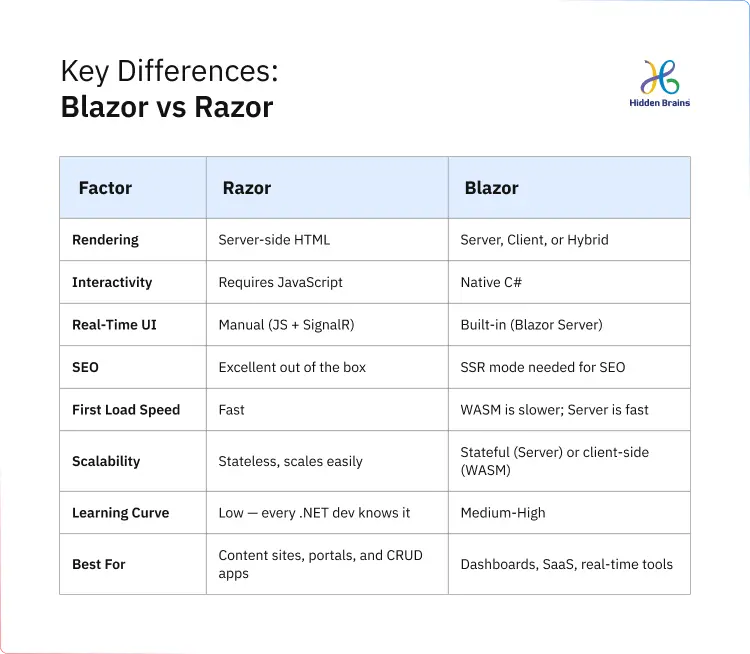
Razor vs Blazor: Simple Comparison
Blazor stands out with its AI-powered capabilities, offering scalability and innovation for modern applications. Razor, on the other hand, remains a dependable choice for traditional web development, providing simplicity and reliability for optimized performance.
This clear distinction helps you make an informed decision based on your needs.
The Technical Differences You Need to Know
Let’s break it down without drowning further in complexities.
Razor shines when you need a fast, secure site with excellent SEO, like a high-volume public portal or content hub. Blazor excels when users expect a rich experience, like a live dashboard or SaaS application.
Razor: The Architecture of Stability
Razor is one of the most stable and widely used patterns in the ASP.NET ecosystem, with over 19% of developers using ASP.NET Core. It follows a simple, predictable flow: the server processes a request, renders HTML, and sends a fully-formed response to the browser.
This stateless, independent request model is its strength, making it easy to scale horizontally, monitor, and maintain under load. Razor is ideal for enterprise systems that prioritize reliability, auditability, and operational clarity.
From a tech leader’s perspective, Razor offers consistency across environments with minimal runtime complexity. It’s great for SEO-driven applications since content is fully rendered before reaching the browser.
However, as user experiences become more interactive, Razor needs JavaScript for dynamic content. While this isn’t a flaw, it introduces a split between backend and frontend, increasing system complexity over time.

Blazor: A Unified Model With Higher Capability and Responsibility
Blazor was introduced to reduce one of the most persistent inefficiencies in modern web development, which is the separation of backend and frontend logic across different technology stacks.
It enables developers to build interactive user interfaces using C#, creating a unified programming model within the .NET ecosystem.
But Blazor is not a single approach. It is a set of execution models, each with different implications for scale, performance, and operational control.
Blazor Server = Centralized Execution + Real-Time UI Updates + Stateful Trade-Offs
But here’s the catch:
- Centralized Execution: Business logic runs on the server.
- Real-time UI Updates: SignalR streams updates, not full page reloads.
- Stateful Trade-offs: Each active user has a persistent connection, affecting scaling.
Scaling = (Concurrency x Memory per Connection) + Network Stability
Blazor WebAssembly: Client-Side Execution & Distributed Responsibility
Blazor WebAssembly moves execution to the browser, reducing server load after the initial download and enabling faster, app-like interactions. However, this shifts execution outside direct server control, leading to longer initial load times and requiring additional SEO strategies. Security demands a zero-trust approach, keeping sensitive logic server-side. This model is ideal when rich interactivity and client responsiveness outweigh initial load performance or strict control over execution environments.
Blazor Web App (.NET 8): A Flexible Hybrid Model
The Blazor Web App model in .NET 8 introduces a flexible, hybrid approach. It allows combining server-side rendering for SEO, real-time server interactivity, and WebAssembly for demanding client-side tasks. This hybrid design mirrors the complexity of modern applications, offering flexibility to tailor architecture to your app’s specific needs.
The Core Architectural Divide: Stateless vs Stateful Systems
The most important distinction between Razor and Blazor is not syntax or developer experience. It is how they handle the state.
Razor operates in a stateless model where each request is independent. This simplifies scaling, improves predictability, and reduces operational overhead.
Blazor Server introduces statefulness, which enables richer interaction but increases complexity in scaling and resource management.
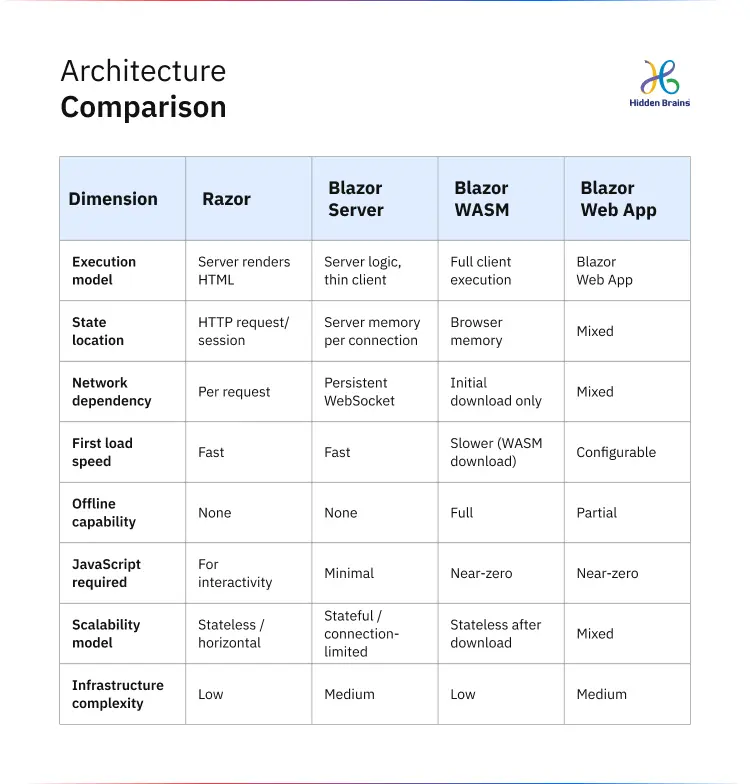
Blazor WebAssembly distributes execution to the client, shifting responsibility away from the server but increasing reliance on external execution environments.
This distinction influences nearly every downstream decision, including cost, reliability, performance, and long-term maintainability. Hiring a dedicated expert could help translate these trade-offs into a clear architectural direction, reduce early design uncertainty, and ensure the system is built with long-term scalability and operational stability in mind.
Security & Governance: More Than a Checkbox
One thing executives often overlook: security is a differentiator, not a burden.
- Razor keeps your logic on the server, predictable, auditable, and low-risk.
- Blazor WASM spreads logic to the browser, think distributed trust, with AOT compilation and logic segregation as guardrails.
- Blazor Server’s persistent connections? Treat them like VIP guests: high maintenance, but the payoff is interactive experiences that feel alive.
Here’s a stat worth having a look at: 70% of enterprise breaches in 2025 were linked to improperly managed front-end logic. That’s your “why we care” moment. This is why implementing zero‑trust security practices is especially important around client‑side code and logic to reduce risk and protect trust.
Don’t Overthink the Frameworks. Let’s Talk and Build It Right.
Contact us
Future-proofing for the Era Ahead
The frameworks you choose today determine how easily AI can be integrated tomorrow. With Blazor, your teams operate in one C# language context, which significantly reduces the “semantic gap” when introducing autonomous agents or AI-assisted features.
.NET 10 now offers Hybrid Render Mode, letting you move components from server to WASM with almost zero friction. WebAssembly isn’t just for browsers anymore; it’s becoming a secure runtime across cloud-edge environments.
Here’s a takeaway: frameworks are no longer just about rendering pages; they are about building future-ready platforms.
How Tech Leaders Should Think About This Decision
In real-world scenarios, this decision is rarely purely technical. It is shaped by organizational reality.
1. Team Expertise
- Blazor: If your team is already experienced with C# and .NET, Blazor might feel more natural. It reduces the need to switch between different languages and tools.
- Razor: If your team is strong in frontend development or familiar with JavaScript, Razor might be quicker because it aligns with existing patterns and tools.
2. Time-to-Market
- Razor: Faster to start with because it’s simpler. It’s great for getting a product out quickly.
- Blazor: Takes more time upfront for planning and setup. However, it can be more efficient in the long run, especially for complex, interactive systems.
3. Existing Systems
- Razor: Works well with legacy ASP.NET applications and can be used for incremental modernization. If you’re updating an old system, Razor fits better.
- Blazor: Ideal for a full-stack transformation, if you’re rebuilding or creating something new from the ground up, Blazor is a good choice.
4. Product Direction
- Blazor: Perfect for apps that need cross-platform development or real-time interactivity (like chat apps or collaborative tools).
- Razor: Better for simpler, content-driven systems where you don’t need heavy interactivity.
5. Ecosystem and Integration
- Razor: Has a mature ecosystem with established patterns, making it easier to integrate with other systems and tools.
- Blazor: Still evolving, so it may require more thought when integrating with JavaScript-heavy third-party systems.
6. Cost and Maintenance
- Razor: Razor is straightforward and cost-effective, low setup and maintenance, making it perfect for simpler, server-rendered applications.
- Blazor: Blazor brings rich interactivity but comes at a higher initial cost and ongoing maintenance due to the complexity of client-side execution and real-time features.
7. Interactivity and Complexity
- Razor: Razor’s strength is simplicity, ideal for content-heavy sites without the need for complex interactivity or client-side processing.
- Blazor: Blazor is the go-to for dynamic, real-time apps, but that extra interactivity brings higher complexity in both development and long-term maintenance.
Choosing the Right Developer: Razor vs Blazor for Your Project?
- Hire a Razor developer: when your choice is about building data-heavy applications that don’t require complex user interactions. It’s cost-effective and reliable for enterprise solutions, internal tools, and simpler dashboards where stability and speed matter most.
- Hire a Blazor developer: if you’re creating interactive, rich-client applications—think real-time collaboration tools, single-page applications (SPAs), or progressive web apps (PWAs), where user engagement and dynamic content are essential. Blazor shines when interactivity and a modern experience are top priorities.
Hidden Brains – Your Partner in .NET Architecture Decisions
Framework decisions shape more than development. They influence performance, scalability, maintainability, and how easily your product evolves.
At Hidden Brains, with over 22 years of experience and a team of 700+ experts, we guide you to the right .NET architecture for your product’s needs. We focus on building solutions that align with your goals and deliver outcomes that matter.
With our expertise in key .NET technologies, we help you make informed decisions to unlock your business’s full potential:
- Blazor: At Hidden Brains, we’re redefining web experiences with Blazor, creating fast, interactive apps that stay smooth with C#.
- Razor: We use Razor to power websites that don’t just work; they perform, delivering speed, SEO, and reliability, all wrapped in clean, server-side code.
- Azure: We help you scale smarter and faster, building secure, cloud-first solutions that keep your business running seamlessly.
- ASP.NET Core: Our expertise in ASP.NET Core allows us to build high-performance, cross-platform apps that grow with you, because we know your business doesn’t wait for technology to catch up.
We don’t just implement technology, we create tailored .NET architectures that drive results, growth, and long-term success for your business.
Frequently Asked Questions
Q1: Can I use Blazor and Razor in the same application?
Yes, and with .NET 8’s Blazor Web App model, this is not just possible but the recommended approach for many scenarios. Use static Razor Pages for SEO-critical public content while embedding Blazor components for interactive sections of the same application. The two models are complementary, not mutually exclusive.
Q2: Is Blazor ready for production enterprise applications?
Absolutely. Blazor has been production-stable since .NET 5 (2020), and .NET 8’s unified model represents significant maturity. Major enterprise organizations are running Blazor Server and Blazor WASM applications at scale. This is not experimental technology; it’s fully supported and production-grade.
Q3: What is the main difference between Razor and Blazor for developers?
The core difference is how interactivity is handled. Razor produces server-rendered HTML and relies on JavaScript for any client-side behavior. Blazor lets developers write interactive UI components in C#; the .NET runtime handles event handling, DOM updates, and state management without JavaScript. For .NET developers, this means a unified language across the full stack.
Q4: Does Blazor WASM hurt SEO?
In its standard form, yes, Blazor WASM is a client-side SPA that search engine crawlers may struggle to fully index. Prerendering significantly mitigates this. For applications where SEO is critical, Blazor Web App with SSR mode or Razor Pages remains the more reliable choice without additional configuration overhead.
Q5: How difficult is it to migrate from Razor to Blazor?
A full rewrite is rarely necessary or advisable. The practical approach is incremental; Blazor components can be embedded into existing Razor Pages applications. Teams typically identify the highest-value interactive areas and migrate those to Blazor components first, leaving stable Razor pages in place. A complete migration is a significant undertaking and should be justified by clear business requirements, not technology novelty.
Q6: Which should I choose for a new .NET project starting today?
For projects starting in 2025 on .NET 8 or .NET 9, Blazor Web App is the most future-aligned choice for anything interactive. It gives you static SSR, server interactivity, and WASM interactivity in a unified model, meaning you’re not locked into a single rendering approach. For simple content or marketing sites, Razor Pages remains perfectly appropriate and faster to deliver.


Conclusion
Deciding between Blazor and Razor is a breeze once you’ve got a clear picture of your project. It all comes down to the kind of website you’re building, how fast you need it to load, and the development style that fits your team. When your goals are well-defined, the right choice will make itself clear.
Still confused which one is the best option? Get a free consultation and discuss your goals with a trusted .NET development company that ensures you follow best practices while minimizing risks and keeping costs in check, so you can focus on what really matters.
