






































































































































Summary
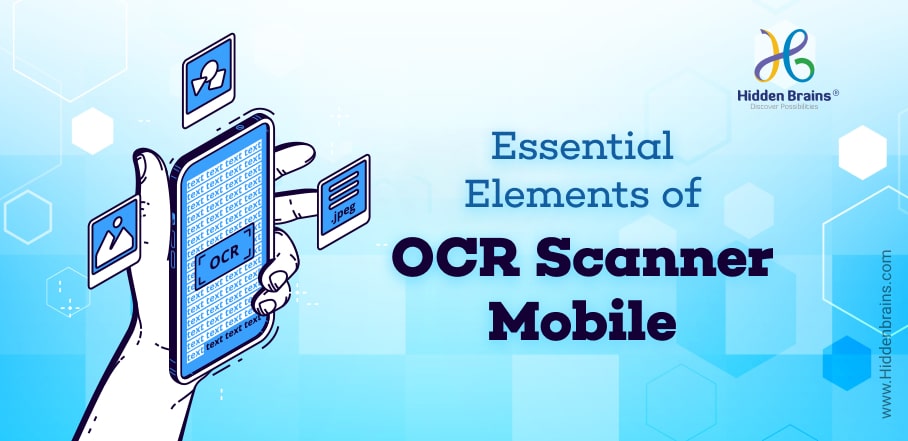
An OCR scanner app uses Optical Character Recognition (OCR) technology to convert images, scanned documents, or photos into editable and searchable digital text. These apps allow users to capture documents through a mobile camera and automatically extract the text using AI and machine learning algorithms. Key capabilities include document scanning, real-time detection, multiple input and output formats, and document management. OCR scanner applications are widely used for tasks like invoice processing, ID digitization, and document archiving, helping businesses and individuals digitize information quickly and efficiently.
With the emergence of AI, mobile apps are becoming smarter and more capable of performing functions that were previously done by humans. OCR Scanner App – or Optical Character Recognition – is an app that was created by Udacity in partnership with Google to scan text and convert it into a digital format using machine learning algorithms on the device itself.
This guide to AI OCR Scanner will introduce you to this new technology, help you understand how it works, and teach you how to use it with your own projects.
You’ll also know how to find good AI (Artificial Intelligence) OCR scanner apps for both Android and iOS systems. So without further ado, let’s jump right in! Let’s start by looking at just what exactly an OCR app is.
History of OCR
OCR stands for Optical Character Recognition. This is a process that involves converting scanned images of text back into text files and making them machine-readable. An AI OCR scanner app is designed to scan real-world objects, people, and even blank paper, so it can convert them into digital data stored in a digital format such as PDF or JPEG.
AI OCR software was created to help with vision impairment by allowing computers to see what people cannot see due to such limitations as poor eyesight or blindness.
For example, if you wanted to read a book you needed someone else who could read it to read it out loud for you or perhaps have an audiobook version where someone else reads it and then downloads it onto your device so you can listen too.
How does Optical Character Recognition (OCR) Work?
Optical character recognition, or OCR, is a method for recognizing and converting images of text into digital data. In short, it’s a way to convert images (such as business cards or PDF documents) into searchable text.
There are several different approaches to performing OCR; one of these is called machine learning. This approach uses artificial intelligence to teach computers how to recognize different characters and even handwritten characters without being specifically programmed for them.
What is an OCR Application?
The AI scanner app is built to make document scanning easy and straightforward. You can convert documents into digital text on your Android devices (phones and tablets) using optical character recognition technology. All you need to do is point your device at a document, take a photo of it and let our powerful software do its job.
Imagetotext.io is one such OCR application. This web-based tool uses Tesseract and other Python libraries along with AI algorithms. Use it to convert images to text accurately and learn how an OCR tool really works.
Must have Features of OCR Scanner Mobile App
AI OCR scanner takes advantage of Artificial Intelligence (AI) technology to enhance your image scanning experience. AI is at its best when you are able to feed it huge amounts of data about a specific task. In an ideal world, we would already have millions of images that were scanned and digitized so that we could teach AI how to scan different types of documents in optimal conditions.
OCR Scanner App User Panel Features:
- Registration
- Login
- Document Conversion
- Various Input Formats
- OCR of Document into Text
- Real-time Document Detection
- Filter Usage
- Push Notification
- Manage Profile
- Various Output Formats
- Document Management
- Multipage Document Assist
OCR Scanner App Admin Panel Features:
- Login
- Dashboard
- Filter Category Control
- Managing Filters
- Reports and Analytics
- Notification
- Sharing Management
- Managing File Format
- Customer Management
- Manage File Conversion
Understanding the Algorithm behind AI OCR Scanner App
In order to understand how to use an OCR scanner, it is important to know what these are and why they are used. First of all, a document is not something that you can visually see like an Apple or a book for example. In fact, documents such as contracts, invoices, and other legal papers may contain information that is hard to decipher by simply looking at them.
However, all of these can be easily converted into digital files by using Optical Character Recognition (OCR) technology which allows you to convert data on documents into editable text files.
Use Case Scenario of OCR Scanner Applications
The technology still holds an immense potential due to the various use-cases of deep learning-based OCR like:
- Development of license plate readers
- Invoice digitalization
- Menus digitalization
- ID cards digitalization
Why Choose Hidden Brains to Develop OCR Scanner App?
Hidden Brains is one of the most trusted and reliable mobile app development companies when it comes to mobile applications development. With a global client base, we are the pioneer in our field. We offer mobile app development services for building customized, cross-platform applications and native mobile apps.
Our users get a seamless experience throughout the stages of the code analysis to the debugging applications. The mobile applications developed by us have aesthetic appeal and are feature-rich with high usability and scalability.
Frequently Asked Questions
What is an OCR scanner app?
An OCR scanner app is a mobile or web application that converts images, PDFs, or scanned documents into editable digital text using Optical Character Recognition technology.
How does OCR technology work in scanner apps?
OCR analyzes images of text, identifies characters using AI or machine learning, and converts them into machine-readable text that can be edited, searched, or stored digitally.
What are the key features of an OCR scanner app?
Common features include document scanning, text extraction, real-time document detection, multiple input and output formats, push notifications, document management, and multi-page scanning support.
What are the common use cases of OCR scanner apps?
OCR apps are widely used for digitizing invoices, ID cards, business documents, menus, and license plates, making physical information easier to store and analyze digitally.
Can OCR apps recognize handwritten text?
Yes, many advanced OCR apps use AI and machine learning to recognize handwritten characters and convert them into editable digital text, though accuracy depends on handwriting clarity.
Why are OCR scanner apps important for businesses?
They help automate document processing, reduce manual data entry, improve accuracy, and speed up workflows by converting physical documents into searchable digital formats.

Conclusion
OCR scanner apps are transforming how businesses and individuals manage documents in a digital-first world. By converting printed or handwritten text into searchable digital data, these applications eliminate manual data entry and make information easier to store, edit, and share. With features like real-time scanning, multi-format support, and AI-driven text recognition, OCR solutions streamline document management and improve operational efficiency. As organizations increasingly adopt automation and digital workflows, investing in a reliable OCR scanner app can help simplify document processing, enhance productivity, and unlock valuable insights from physical documents.