


























































































































Summary
- Understand the five business risks of an aging mobile app.
- Assess whether your app is ready for modernization.
- Identify clear go/no-go signals for upgrading now.
- Choose between optimization, refactoring, re-platforming, and rebuilding.
- Follow a phased, low-risk modernization roadmap.
- Understand key cost drivers and indicative investment.
- Learn how Hidden Brains approaches mobile app modernization.
Mobile app modernization is a business decision, not simply a technology upgrade. It affects risk, speed, cost, customer experience, and future flexibility. The stakes are measurable: 59% of consumers report slow mobile performance, 43% have experienced app crashes, and 45% have encountered bugs. The right time to act is when the existing app begins to constrain business performance, not when it reaches a certain age.
The key question is how much change is necessary. The right answer may be optimization, refactoring, re-architecture, or a full rebuild. This guide provides a framework to assess the need, determine the right path, and understand the investment before committing resources.
Why App Modernization Matters — and the Cost of Waiting
The executive question: Why should this be on our radar at all?
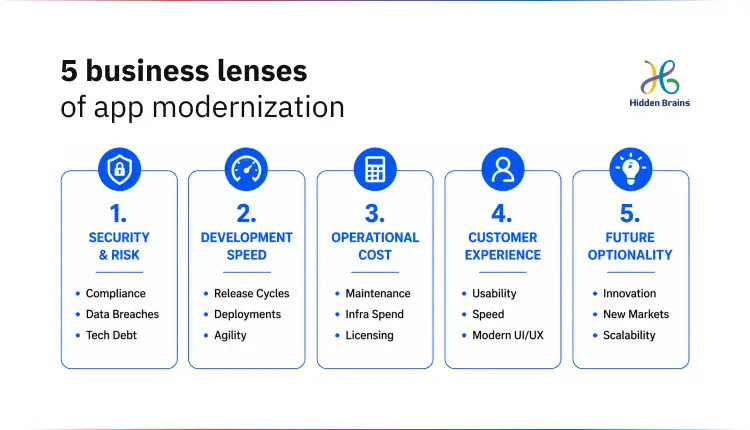
Modernization matters because a mobile app is a live operational asset, and an aging one quietly taxes the business across five dimensions:
- Risk: Security vulnerabilities, compliance gaps, and increasing operational exposure.
- Speed: Slower release cycles and longer time to bring new features to market.
- Cost: Rising maintenance effort with diminishing engineering output.
- Customer experience: Poorer performance, usability, retention, and conversion.
- Future optionality: Less flexibility to adopt AI, new integrations, platforms, or emerging technologies.
When any one of these degrades, the app stops being an asset and starts being a liability, usually before anyone puts it on a roadmap.
The cost of waiting is rarely a single event; it compounds. Technical debt accumulates the way legacy code quietly piles up maintenance costs, so each new feature takes longer and costs more. Talent risk grows as fewer engineers want to work on outdated frameworks, and the ones who understand your legacy code become harder to replace.
Security exposure widens as dependencies go unpatched. And customer experience erodes silently; for context, Google’s own guidance notes that 53% of visits are abandoned when a page takes longer than three seconds to load, and mobile users are the least patient segment of all. None of this forces a decision on any given day, which is exactly why it gets deferred until a crisis makes the decision for you.
Signs Your Mobile App Needs an Upgrade
The executive question: Do we actually have a problem?
Your app needs modernization when the friction is structural, not cosmetic, when problems keep recurring after you fix them, or when the app can no longer keep pace with the business. Occasional bugs are normal; persistent crashes, slow releases, and workarounds are signals. The most reliable way to separate the two is a structured pre-modernization assessment across five areas, so a decision rests on evidence rather than the loudest complaint.
Run your app through this checklist before deciding anything. If you’re seeing red flags in two or more dimensions, modernization has moved from “someday” to “plan it now.”
| Dimension | What to check | Red flag |
|---|---|---|
| Business value | Does the app still support current business goals, revenue, and workflows? | New business opportunities are blocked by what the app can’t do |
| Technical health | Architecture, code quality, technical debt, dependency freshness, crash and performance metrics | Small changes need great effort; recurring crashes, slow load, high memory/battery use |
| Platform compliance | Target OS/SDK levels, store policy status, security patch currency | Can’t ship updates or stay discoverable due to platform/store requirements |
| User impact | Retention, reviews, support tickets, task completion, dated UX vs category norms | Reviews and churn cite speed, reliability, or a confusing interface |
| Delivery readiness | Release frequency, build/test automation, ability to onboard new developers | Releases are slow and risky; only one or two people can safely touch the code |
The point of the assessment is proportionality. A weak score on user impact alone often points to a redesign, not a rebuild. Weak technical health and delivery readiness together usually mean the architecture, not the interface, is the problem. Naming the specific dimension keeps you from over- or under-reacting.
Go/No-Go Signals: When You Should Upgrade Now
The executive question: Should we act — now, or can it wait?
Some signals turn “we should look at this” into “we need to act this quarter.” Treat any of the following as a Go signal:
- OS/SDK deprecation or store-policy blocks — You can’t publish updates or stay discoverable to new users because the app targets outdated platform versions. This is a hard deadline, not an opinion: Google Play, for example, requires existing apps to target a recent Android version (Android 15 / API 35, with the bar rising annually) to remain available to new users on newer devices.
- Rising crash rates, performance regressions, or security vulnerabilities in dependencies — Reliability or exposure is trending the wrong way, and patches aren’t holding.
- High maintenance cost with low feature velocity — You’re spending more to keep the lights on and shipping less, because legacy architecture makes every change expensive.
- A clear business opportunity is blocked — A new market, integration, payment method, or AI capability is off the table until the app changes.
The reason to move on a clear Go signal rather than wait: The cost of delay compounds. Technical debt grows, the security window stays open, and the talent who can safely modernize the app gets scarcer and more expensive. Acting on a planned schedule is always cheaper than reacting after a store delisting, a breach, or a lost deal.

Is Your App Holding Growth? Get a structured assessment.
Assess My AppModernize or Rebuild? Choosing the Right Approach
The executive question: What should we actually do about it?
Modernization is a spectrum, not a binary, and the right approach is the smallest intervention that removes the constraint you identified in the assessment. A rebuild is the most expensive, highest-risk option and should be the last resort, not the default. Match the approach to the root cause:
| Approach | What it means | Typical trigger | Relative cost & risk | Choose when |
|---|---|---|---|---|
| Optimize / patch | Targeted fixes: performance tuning, dependency updates, UX refresh | Cosmetic or isolated issues | Low | The foundation is sound; problems are surface-level |
| Refactor | Restructure code internally without changing what users see | Technical debt slows delivery, but architecture is salvageable | Low–medium | Behavior is fine but the codebase is hard to change safely |
| Re-platform / re-architect | Move to modern frameworks, cloud, or updated architecture; migrate module by module | Scalability, integration, or platform-compliance limits | Medium–high | The app’s core is limiting growth but much logic is worth keeping |
| Rebuild | Reconstruct the app on a new foundation | Multiple deep issues at once (architecture + security + UX + scale) | High | Refactoring can’t get you there; the app can’t meet future needs |
Match the intervention to the problem
If the problem is inside the technology:
- Architecture → Refactor or rebuild
- Technical debt → Refactor or rebuild
- Performance → Refactor or rebuild
If the problem is in the user experience:
- Visual dating → Optimize or redesign
- Navigation → Optimize or redesign
- Onboarding → Optimize or redesign
Most modernization programs combine both. You might refactor payments, re-platform the data layer, and redesign onboarding, sequencing each intervention by business impact rather than changing everything at once.
Considering a cross-platform move? Hire cross-platform developers to reduce duplicated engineering effort and simplify maintenance, but the decision should be based on your app’s architecture, performance requirements, native capabilities, and long-term roadmap.
How to Approach Modernization: A Low-Risk Roadmap
The executive question: How do we do this without breaking what works?
The safest way to modernize is incrementally, so users experience continuity while the foundation changes underneath them. A “big-bang” rewrite that goes dark for months is where most modernization budgets and timelines break. A four-phase approach keeps risk contained:
- Discovery & audit — Review the architecture, benchmark performance, and quantify technical debt against the five assessment dimensions.
- Roadmap & strategy — Decide, module by module, between refactor, re-platform, and rebuild, and prioritize the highest-impact modules first. The goal is a sequenced plan, not a single irreversible bet.
- Incremental execution — Migrate feature by feature using feature flags and parallel environments, so old and new run side by side and you can roll back safely. For the iMAK, we ran the existing system and the new multi-platform system (web portal plus a mobile app for on-site staff) in parallel, migrated real production data carefully, and cut over without interrupting daily operations.
- Continuous optimization — After launch, monitoring, analytics, DevOps refinement, and documentation keep the app healthy, so you’re modernizing continuously in small steps instead of facing another cliff-edge rebuild in a few years.
Modernize without disruption. Build your roadmap.
Discuss My Roadmap
This phased model is also the answer to “can we modernize without disrupting existing users?” — Yes, if you migrate incrementally with parallel environments and a real data-migration plan, rather than switching everything at once.
How Much Does Mobile App Modernization Cost?
The executive question: What will this cost us?
There is no single price, because cost scales with the approach you chose above: a targeted optimization or refactor is a fraction of a full rebuild. The honest answer is a range tied to scope, and the biggest budgeting mistake is ignoring the hidden costs that sit outside development.
| Approach | Typical effort | Indicative investment* | Main cost drivers |
|---|---|---|---|
| Optimize / patch | Weeks | Lowest | Performance improvements, dependency and OS/SDK updates, UX tweaks |
| Refactor | Weeks–months | Low–medium | Code restructuring, test coverage, regression testing |
| Re-platform / re-architect | Months | Medium–high | New framework or cloud environment, data migration, integration rebuild |
| Full rebuild | Multiple months+ | Highest | Ground-up development, full data migration, parallel running |
Hidden Brains indicative rates: Hire mobile app developers at $25/hour. Final rates vary based on expertise, technology stack, engagement model, and project scope. These are indicative rates and not fixed project pricing.
The costs that catch teams off guard aren’t in the build; they’re in migrating years of data without loss, rebuilding integrations, running old and new systems in parallel during transition, and change-managing the people who use the app daily.
Industry estimates commonly put these at roughly 30–45% on top of the base development figure, so budget for them up front. If you’re deciding whether to build modernization capacity in-house or bring in specialists, it’s worth comparing the fully-loaded cost of both, including the hidden line items, before you hire mobile app developers or commit an internal team.
How Hidden Brains Approaches Mobile App Modernization
Hidden Brains approaches modernization as business transformation enabled by technology, starting with the operational bottleneck, not the tech stack. Our work typically begins before framework selection: understanding where the current app’s processes, data, and architecture are breaking down, then choosing the smallest effective path from the spectrum above.
That’s how the legacy modernization worked for iMAK: an on-site process study, an interactive prototype validated with the client, role-based security for live data, integration with the client’s existing accounting and CRM systems, and a carefully migrated, uninterrupted cutover. You can read the full legacy system modernization case study for details.
As a CMMI Level 3, ISO 27001, and ISO 9001-certified partner with two decades of experience across 107 countries, our role is to connect the modernization decision to execution, whether you need a full program or want to hire mobile app developers to strengthen an in-house team.
Frequently Asked Questions
What factors should I keep in mind before modernizing my app?
Before touching code, get clear on five things: the business outcome you’re actually buying (faster releases, lower cost, a new capability), a full inventory of your integrations and dependencies, where your data lives and how it will move, whether you can run the old and new versions in parallel during the switch, and the costs beyond development — migration, integration rebuilds, and change management. Modernization goes wrong when it’s run as a tech project instead of a business one. Anchor it to a specific outcome, and the rest of the scope falls into place.
What are the most common mistakes to avoid during app modernization?
The frequent ones: rebuilding from scratch when a targeted refactor would have done the job, a “big-bang” cutover with no rollback plan, underestimating data migration and integrations, modernizing the technology while leaving a broken process untouched, and budgeting only for the build rather than the 30–45% of surrounding costs. Most of these trace back to skipping the assessment and jumping straight to “let’s rebuild.”
How do I protect my data and users during the migration?
Treat data migration as its own workstream, not an afterthought. Back everything up, migrate in stages with validation at each step, and run the old and new systems in parallel so you can verify results and roll back if needed. Keep users on the existing app until the new one is proven, then cut over — ideally in a low-traffic window with a clear rollback path. Handled this way, users experience continuity instead of a disruptive switch.
How should I prepare my team for a modernization project?
Decide early who owns the product and the day-to-day decisions internally, even if delivery is outsourced , projects stall when no one can approve trade-offs quickly. Make sure the current app’s behavior, business rules, and integrations are documented (or budget time to rediscover them), free up the people who understand the legacy system, and plan a simple communication and training path for the staff or customers who use the app daily.
What should I ask a development partner before I hire them?
Ask how they’d decide between refactor, re-platform, and rebuild for your specific case, a strong partner recommends the smallest effective option, not automatically the biggest. Ask for modernization case studies with uninterrupted cutovers, how they handle data migration and rollback, who owns testing, and how they keep you running during the transition. Certifications and years delivering live systems matter here. If you mainly need extra capacity rather than a full program, it’s reasonable to hire mobile app developers with modernization experience to augment your own team.
How will I know the modernization actually worked?
Define success before you start, in numbers you can check afterward: crash rate and load time, how often you can ship a release, monthly maintenance hours or cost, user retention or conversion, and whether the business capability you were blocked on is now live. If those move in the right direction, the investment paid off. If you don’t set them upfront, you’ll have only opinions to judge by.


Conclusion
The teams that manage aging apps well don’t modernize most often; they avoid letting modernization become an emergency. Without a repeatable decision framework, teams tend to fall into one of two costly traps: neglect until something breaks or an over-scoped rebuild.
A clear framework changes that. Assess the app across five dimensions, identify the go/no-go signals, and match the smallest effective intervention to the actual constraint. Modernization then becomes continuous, planned, and incremental, not a periodic gamble.
If you’re unsure where your app stands, start by scoring it, or book a free 2-hour consultation for personalized recommendations based on your app, goals, and use case.